
AI voices & video dubbing locally on your PC.
Design new voices, use authorized voices, translate videos with multiple speakers and export finished creator content — local, private and without forced cloud workflows.
- Create AI voices from text descriptions
- Detect multiple speakers and dub them naturally
- One local workflow from import to export
- Create talking AI avatars from a portrait and a voice
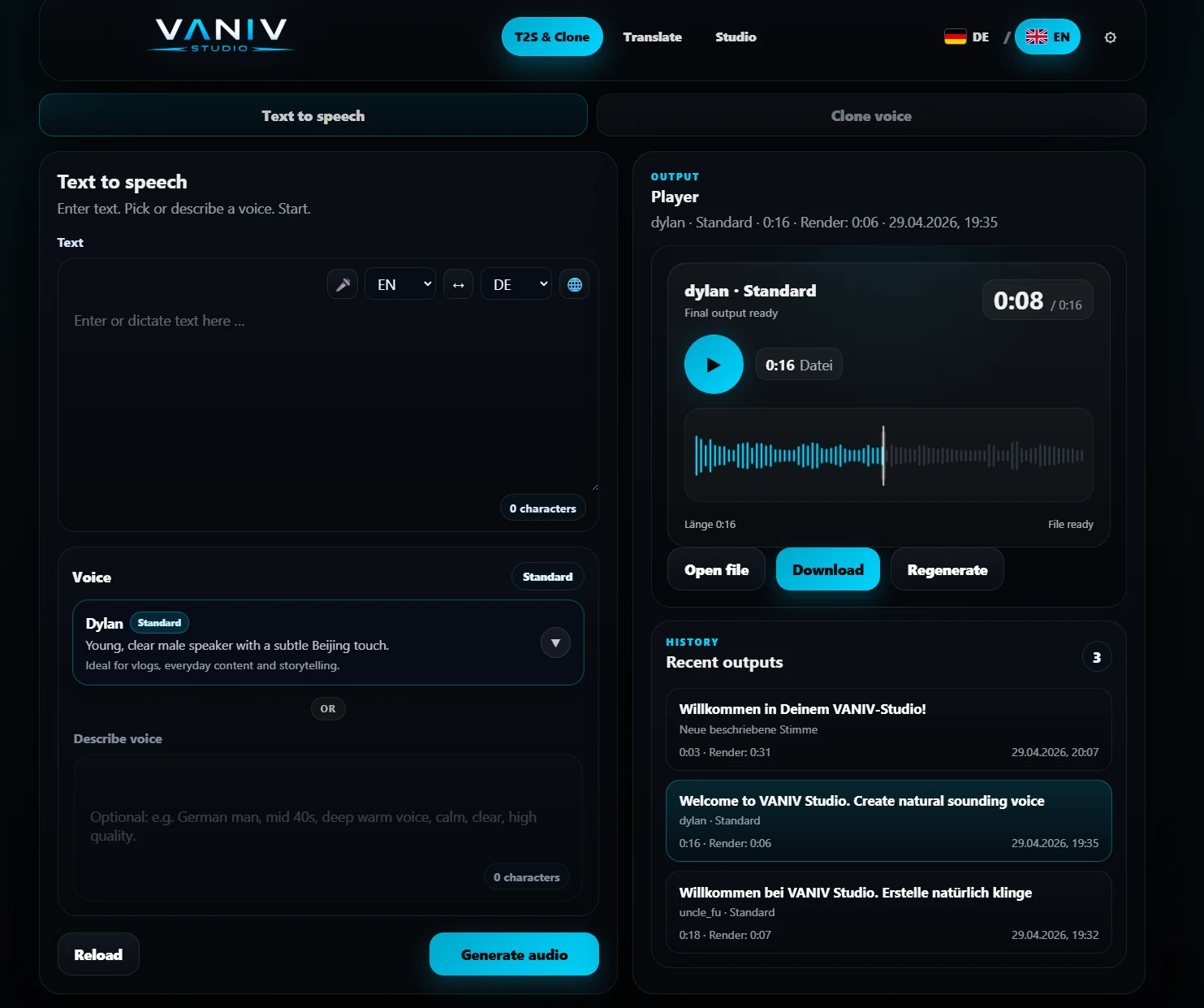
Voice design, not just voice cloning.
Describe the voice you actually need. VANIV helps you create new speaker voices from text descriptions — for YouTube, courses, product videos and dubbing.
- No recording template required
- Better prompts, better voices
- Works inside a local VANIV workflow
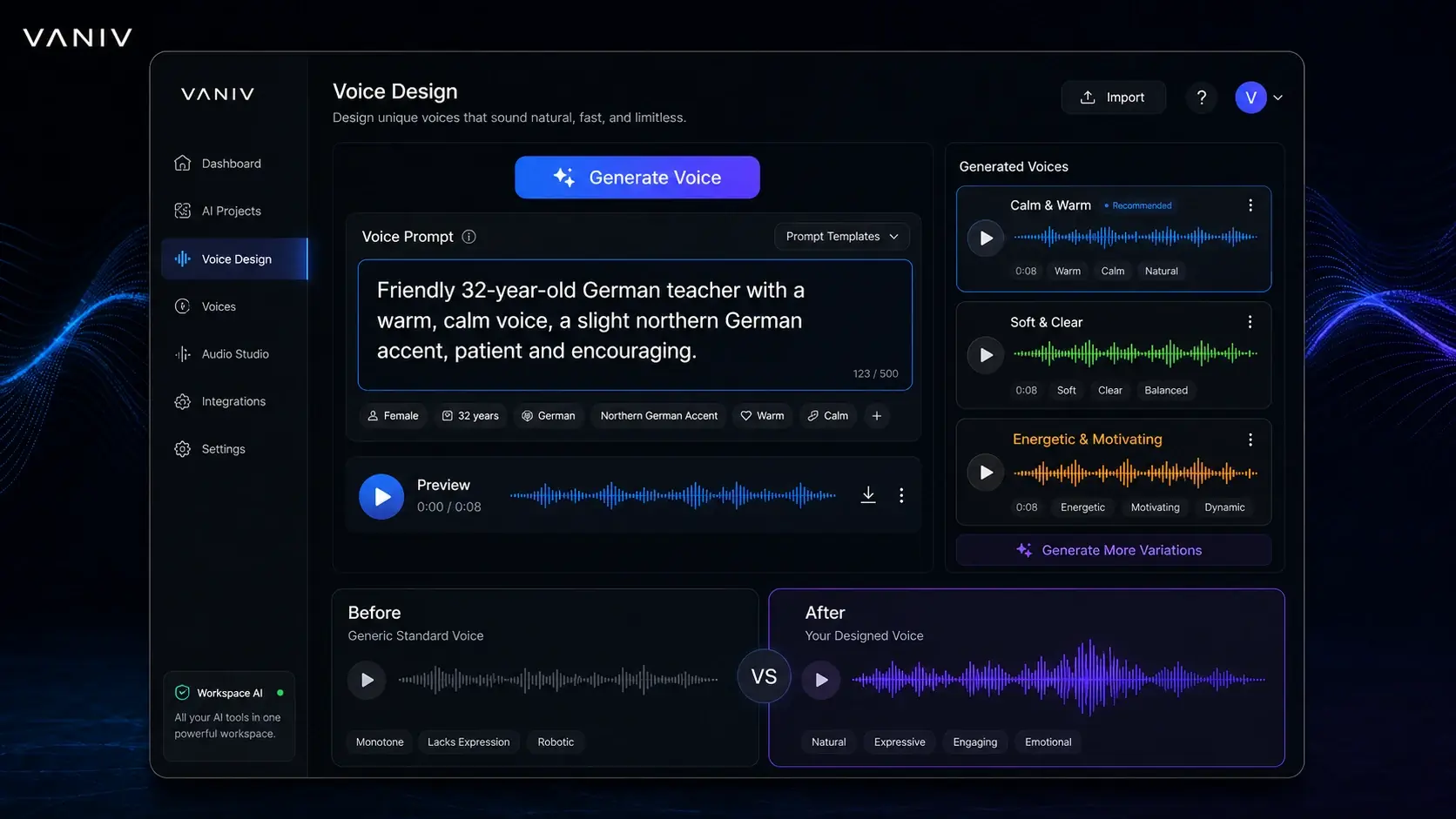
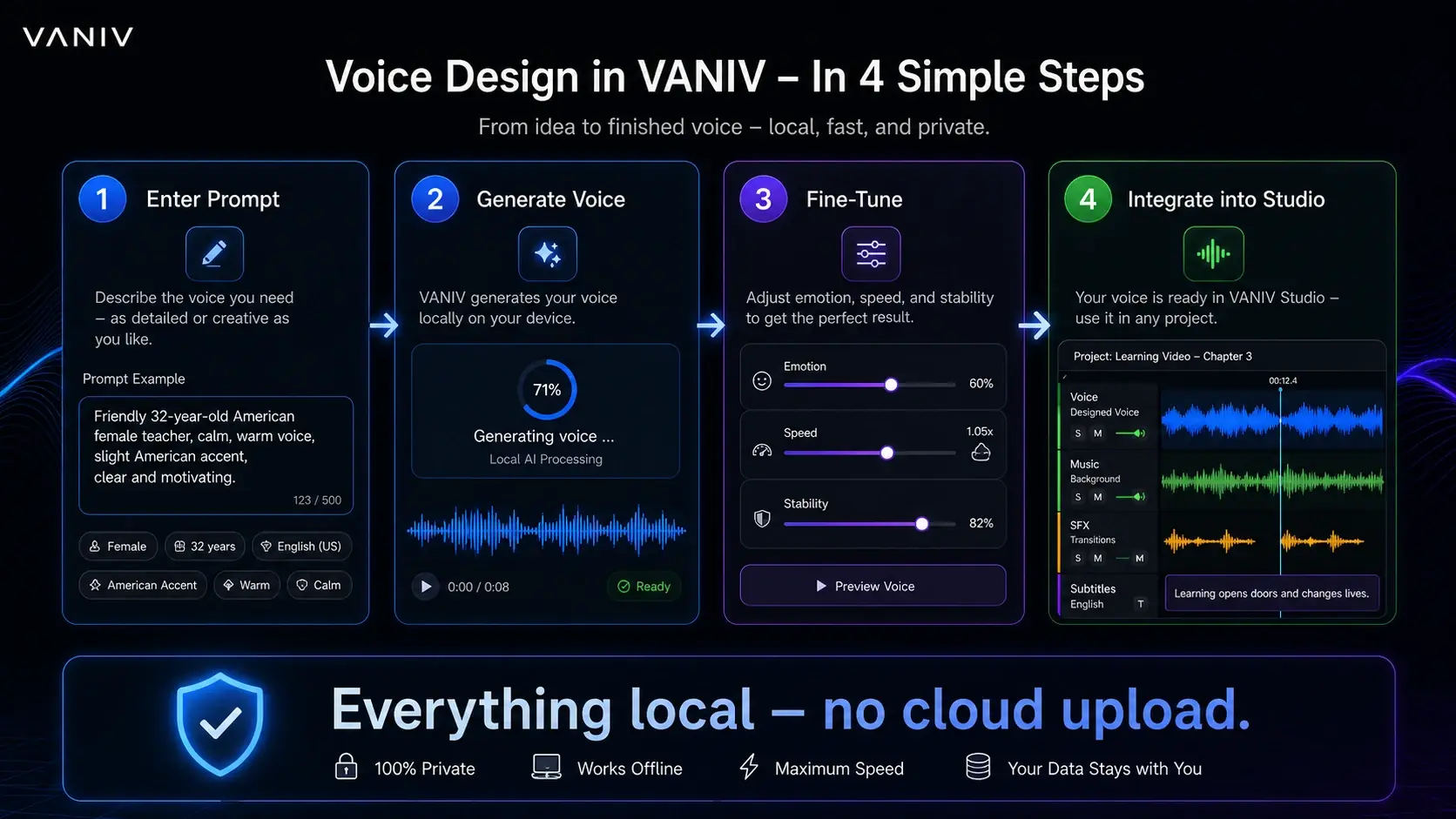
From prompt to a finished speaker voice.
Voice design is more than a demo feature. Inside VANIV, a text description can become a reusable voice for text-to-speech, video dubbing, subtitles and final export.
Translate videos. Redub dialogue. Keep multiple speakers.
VANIV analyzes your video, detects speakers, builds dialogue cues, translates the content and renders a new audio track with one or multiple voices.
Import video
Upload a file or import a supported link. VANIV prepares audio and transcript locally.
02Detect speakers
Dialogues are analyzed and speaker segments are assigned to cue blocks.
03Translate & dub
Create new language versions with designed, owned or authorized voices.
04Export
The new language is mixed with video, ambience, subtitles and SFX as a finished preview or file.
One studio workflow instead of ten tabs.
VANIV combines voice design, voice cloning, Translate Studio, multitrack audio, SFX, subtitles and export in one local creator workflow.
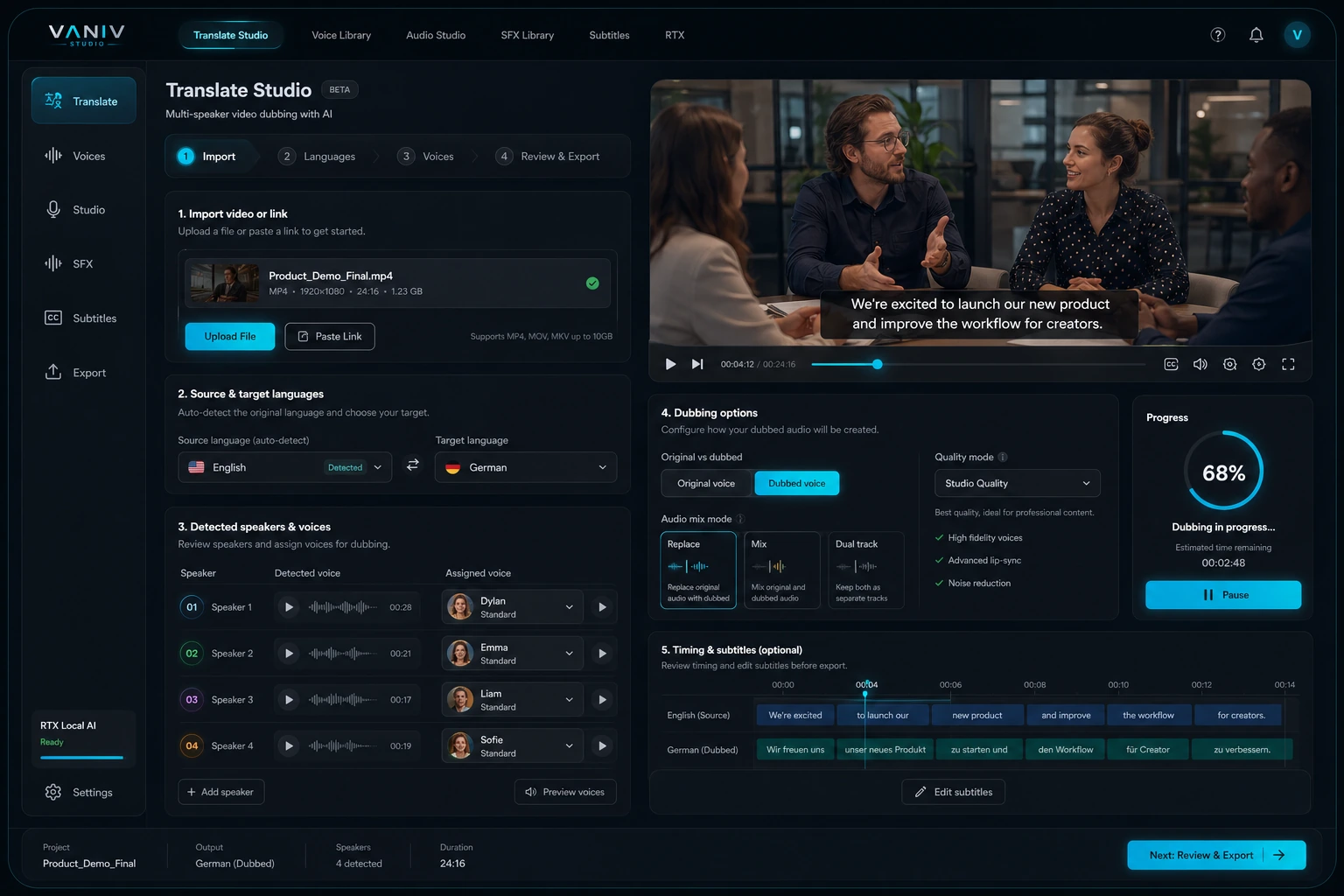
Everything for modern creator production.
Audio, video, voices, translation and export — bundled cleanly.
Voice Design
Create new speaker voices from text descriptions and reuse them inside your workflow.
Voice Cloning
Use your own or authorized voices for consistent creator production.
Video Translation
Translate videos into other languages and create a new audio track with timing and export.
Multi-Voice Dubbing
Detect multiple speakers and render dialogue with matching voices per speaker.
Text-to-Speech
Create natural voiceovers for YouTube, reels, shorts, courses and product videos.
AI Avatars
Turn a portrait and a voice into a talking avatar for videos in multiple languages.
Subtitles
Create transcripts, subtitles and exportable files for social media.
Export
Export audio, video, subtitles and project results for your publications.
One portrait. One voice. Multiple languages.
VANIV Avatar Studio combines a portrait with your own, authorized or designed voice. It creates a talking AI avatar for tutorials, product videos, courses and social media—without recording every language version on camera again.
1. Choose a portrait
Use a suitable image as the visual foundation for your presenter.
2. Assign a voice
Connect the avatar with your own voice or a designed VANIV voice.
3. Choose a language
Create new language versions for international content.
4. Export the video
Turn the result into a finished talking-avatar output.
Cloud tool chaos vs. VANIV Studio
VANIV bundles voices, dubbing, studio and export into one controllable local workflow.
VANIV combines AI voice generation with a local production workflow.
The difference matters: many tools create only an audio file. VANIV connects voice, video, subtitles, timing, SFX and export into a workflow for real creator projects.
A local AI studio becomes especially useful when you produce content regularly. One voiceover is easy to generate. But YouTube videos, courses, product demos, reels, Shorts or client projects need more than a polished demo voice.
You need repeatable voices, clear project files, accurate subtitles, natural translation, controllable exports and fewer handoffs between tools. VANIV brings those steps together in a creator studio for voice and video.
Local-first does not mean cloud is bad by default. Cloud tools are convenient and often very fast. VANIV is for creators who want more control over files, voices, variants and recurring production.
Voice as a production asset
Designed, owned or authorized voices can be reused across several projects.
Voice and video together
VANIV connects voiceover, dubbing, subtitles, timing and export.
Less tool chaos
Instead of ten tabs and many intermediate exports, you get a clearer desktop workflow.
More control
Local processing reduces cloud dependency and gives you more control over sensitive projects.
Which creators benefit most from VANIV?
VANIV becomes most useful when voice and video are not one-time experiments, but part of your regular output.
YouTubers with several languages
Translate videos, keep speaker roles and export new language versions for international reach.
Voice cloning for own projects
Use your own or authorized voices for recurring voiceovers, tutorials and product videos.
AI voices without pure cloud dependency
Create voiceovers and speaker voices local-first on your Windows PC.
Interviews and multi-speaker videos
Multiple speakers, dialogue and translations are easier to structure than with simple TTS.
Agencies and client projects
Local workflows help with sensitive files, variants, approvals and repeatable production.
Creators with own hardware
Use GPU, RAM and SSD for local AI voices, video dubbing and export.
Creators who do not want another camera recording
Build a recognizable presenter from a portrait and a voice for tutorials, product videos and multilingual content.
When VANIV fits better than a classic cloud tool
If you only need to voice one short sentence per month, a cloud tool is probably easier. That is completely fine. VANIV becomes more interesting once voice production becomes a recurring part of your work.
Sound quality is only one part of the decision. What matters is how reliably you can repeat corrections, variants, speaker profiles, subtitles, dubbing and exports. In regular production, a stable workflow matters more than a single polished demo.
- You want to bring videos into other languages regularly.
- You need owned, designed or authorized voices.
- You want less jumping between cloud tools.
- You work with sensitive or unpublished files.
- You want subtitles, voiceover and export to connect.
- You want to test local-first instead of pure browser dependency.
VANIV Studio is built for creators who turn voice into real content.
Not another tiny AI tool for one demo clip. VANIV is designed as a local AI studio where voice, video, subtitles, dubbing and export work as one production process.
The core idea is simple: many creators need more than an AI voice. They need a voice that remains repeatable in real projects. A YouTube video, course lesson, product demo or international clip also involves text, timing, speaker roles, translation, subtitles, ambience, SFX, corrections and export.
This is where a local AI studio becomes useful. If every step is spread across another cloud tool, you quickly get ten tabs, many intermediate exports and little control. VANIV brings the key steps closer together in a desktop workflow: create voice, reuse voice, translate video, review dubbing, control subtitles and export the result.
The goal is not to pretend cloud tools are bad. Cloud is often convenient and fast. VANIV is for creators who want the next step: more control over their own files, less subscription and credit pressure, more repeatability and a workflow that does not break apart at every correction.
Voice design, text-to-speech and authorized voice cloning for recurring creator projects.
Translation, speaker roles, dubbing, subtitles and export are designed to work together.
Local-first means more control over project files, versions, sensitive content and workflows.
Practical outcomes for recurring creator work.
VANIV is built around the outputs creators need: reusable voices, multilingual videos, subtitles, audio tracks and publishable exports.
A German video can become an English, Spanish or French version with a new voice track, subtitles and export.
Video dubbing with multiple speakersInterviews, podcasts or dialogue videos need more than one flat voice. Speaker roles and timing must stay understandable.
Create AI voiceovers locallyCreate voiceovers for Shorts, reels, product videos, courses and YouTube content without moving every test fully into a cloud tool.
Reuse your own voiceWith authorized voice cloning, recurring speaker profiles for series, courses or client projects can be managed more structurally.
Prepare multi-speaker projectsWhen several people speak, a local dubbing workflow becomes more useful than a single TTS export.
Test local AI on your own hardwareWith the right GPU, RAM and SSD, local AI production becomes much more comfortable and predictable.
A shorter path from raw material to finished export.
The value does not come from one isolated feature. It comes from the order of the steps.
Import
Start with text, audio or video. VANIV is designed around creator material, rather than isolated demo sentences.
Voice
Use voice design, your own voices or authorized speaker profiles for consistent results.
Dubbing
Translation, speaker roles, subtitles and timing are reviewed in the context of the video.
Export
The goal is a usable output for YouTube, social media, courses, client projects or internal content.
Cloud is convenient. Local is more controllable. Both have their place.
VANIV is most useful when voice and video production is a recurring part of your work.
Cloud tools fit better if …
you only need occasional short voiceovers, do not want local hardware, want to start quickly in the browser and are comfortable uploading your material.
VANIV fits better if …
you produce regularly, use owned or authorized voices, want to bring videos into new languages and need more control over files, variants and exports.
Local AI needs hardware, setup and clean workflows. In return, you get more control.
Voice cloning should only be used with your own or clearly authorized voices.
VANIV is being developed as a dependable creator workflow for regular voice and video production.
Get earlier updates, suitable test invitations and a 15% launch discount.
Join VANIV Early Access for free. You will receive important development and launch updates and can be invited to suitable stable test waves.
VANIV Early Access
On your first VANIV license after the product launch.
- ✓ Priority information about suitable stable test waves
- ✓ Important development and launch updates
- ✓ 15% off your first VANIV license
- ✓ Free to join, no commitment and easy to unsubscribe
Confirm your email after signing up. You are only added after that confirmation.
Learn more about local AI workflows
Prompt examples, voice cloning comparison and local VANIV workflow.
Voice CloningClone your own voiceRecording, quality and safe use of your own or authorized voices.
Video DubbingTranslate AI videos locallyVoice, subtitles, SFX and export in one workflow.
ComparisonCloud AI vs local AICosts, credits, privacy and control honestly compared.
Why VANIV Studio is more than a single TTS tool.
VANIV is built for creators who regularly produce audio and video content and need a controllable local workflow.
Local AI instead of tool hopping
Instead of splitting voiceover, subtitles, dubbing, SFX and export across multiple cloud tools, VANIV brings the key steps into one desktop workflow on your PC.
Voices for real production
You can create new AI voices from descriptions, use your own or authorized voices and manage speaker roles more consistently for recurring creator projects.
Video dubbing with context
VANIV goes beyond text-to-speech. The workflow is designed around videos, multiple speakers, timing, subtitles and final export.
More control over files
Local processing reduces cloud dependency and gives you more control over project files, test versions, renders and sensitive voice material.
For YouTubers, course creators, agencies and creators with regular output.
VANIV becomes especially useful when you need more than one demo voice: series voiceovers, training videos, product demos, translated YouTube videos, reels, shorts or local AI workflows for client projects. The focus is dependable, repeatable production.
Frequently asked questions
Want to test VANIV locally?
Test voice design, TTS and video dubbing in one local creator workflow.
Join Early Access & save 15%