
Learn how to design a reusable AI voice with clear prompts instead of relying on random demo results.
VANIV Blog • Voice Design
Long-tail focus
Create AI voice from text description
For whom?
Creators, YouTubers and agencies
Local-first benefit
Test, save and reuse designed voices
How to Create a Custom AI Voice from a Text Description
Yes — you can create a new AI voice from a text description without cloning a real person. With voice design, you describe the speaker you want — age, tone, energy, accent, pace, emotion and use case — then generate and refine a reusable custom voice for YouTube, courses, dubbing or product videos.
This guide explains how to create a custom AI voice from a prompt, which descriptions produce better results, how voice design differs from ordinary text-to-speech and voice cloning, and how to reuse designed voices in a local VANIV workflow.
Useful for tutorials, courses, product videos, faceless channels and multilingual content workflows.
Voice design becomes stronger when it is part of a repeatable VANIV workflow, not just a one-off test.
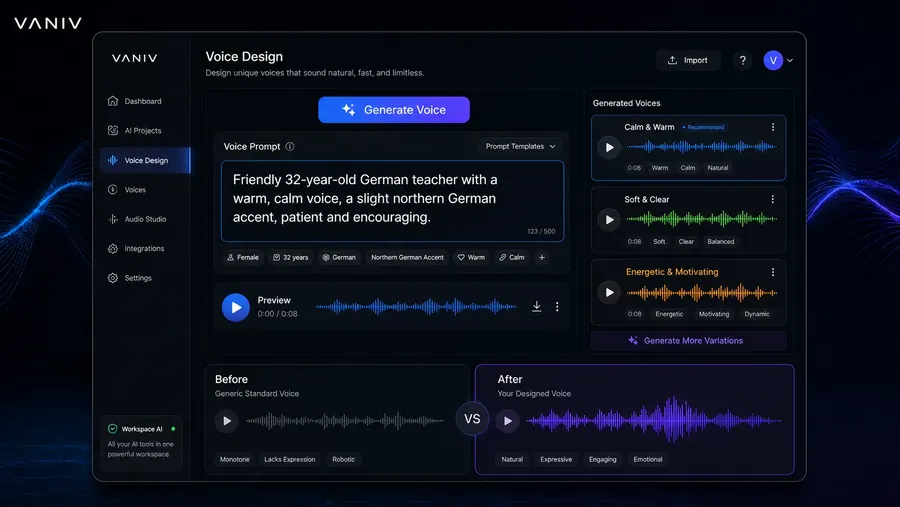
Table of contents
Jump to the key sections
Quick answer
Can you create a custom AI voice from a text prompt?
Yes. Voice design generates a new speaker identity from descriptive attributes instead of copying an existing person. That is different from ordinary text-to-speech, where the text is the content to be spoken, and different from voice cloning, where a real reference voice is reproduced.
Describe role, age range, tone, accent, pace, energy and audience. Generate several variants, compare them, keep the strongest voice and reuse it across local TTS or dubbing workflows.
See VANIV’s local AI voice generator · Compare with local voice cloning
Summary
Voice design is the better starting point when you need a new speaker voice.
Voice design means describing a voice instead of copying a real one. You define age, gender, energy, accent, speaking pace, emotion, personality and use case. The result is a new AI voice that fits your content.
For many creators, that is more practical than voice cloning. You do not need a perfect voice recording, a real reference voice or a complicated rights discussion. For brands, YouTube channels, courses and explainer videos, voice design is often the right middle ground: creative, controllable and reusable.
Key takeaways
- Voice design creates new AI voices from prompts.
- Voice cloning copies or imitates an existing voice.
- Good prompts include role, age, emotion, accent, pace and audience.
- Voice design is ideal for recurring creator voices and brand voices.
- In a local studio like VANIV, a designed voice can be reused for TTS, dubbing, subtitles and export.
Basics
Voice design vs. voice cloning: the difference matters.
Many people put everything into one bucket. That is the mistake. Voice design and voice cloning solve different problems.
Voice Cloning
- copies or imitates an existing voice
- needs your own or authorized voice material
- is strong for personal brands and recurring speakers
- is more legally sensitive when third-party voices are involved
- depends heavily on recording quality and rights
Voice Design
- creates a new voice from a description
- does not require a real speaker as a reference
- is strong for roles, brand voices and creative speaker profiles
- is often cleaner because no real person is replicated
- depends heavily on prompt quality and refinement
Voice design vs. voice cloning as a quick decision table
Criterion
Voice Design
Voice Cloning
Real recording needed?
No
Yes
Imitates a real person?
No, new voice
Yes, existing voice
Best for
brand voices, roles, YouTube, courses
own voice, authorized speakers
Main quality lever
prompt and refinement
recording quality and rights
Legal risk
usually lower
higher with third-party voices
The simple rule
If you want to reuse your own voice digitally, voice cloning is interesting. If you need a new voice suited to your content for a channel, course, ad clip or dubbing workflow, voice design is often the cleaner start.
For classic cloning, read Clone your own voice. For the legal side, read Law and ethics in voice cloning.
Prompt Engineering
Vague prompt in, generic voice out.
In voice design, the prompt is not decoration. It is the creative direction for the AI voice.
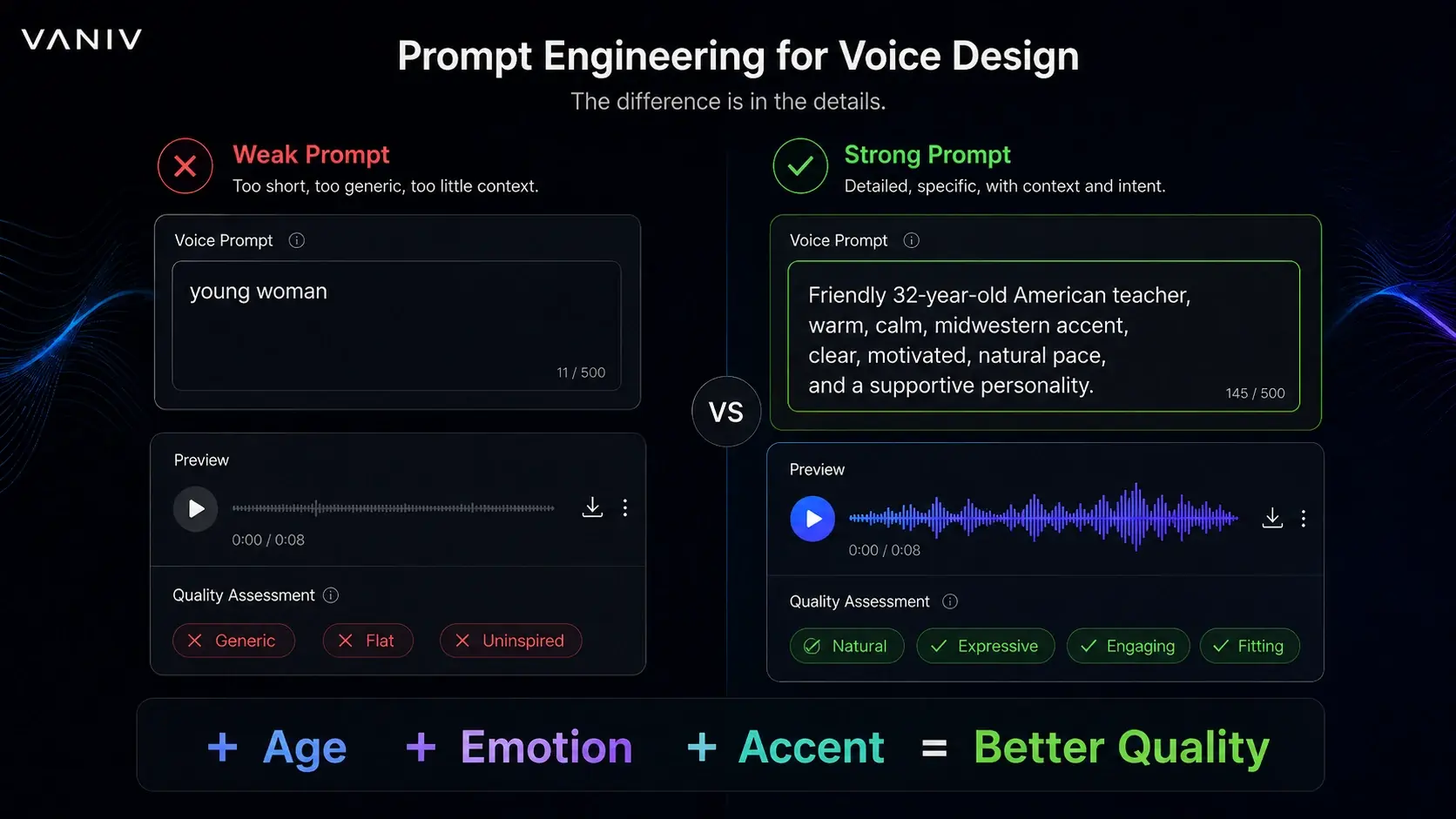
A weak prompt describes the voice only on the surface. A strong prompt defines the role, target audience, tone, pace, pronunciation and use case. That is the difference between a generic synthetic voice and a voice that actually fits a YouTube channel, course, product video or dubbing workflow.
Prompt template to copy
Create a [age + gender + energy] voice for [use case]. The voice should feel [personality]. Tone: [warm, clear, deep, bright, calm, present]. Speaking pace: [slow, natural, dynamic]. Pronunciation: [neutral, clear, English, internationally understandable]. The voice should make [target audience] feel [effect] and should be especially suitable for [YouTube, courses, product videos, tutorials, dubbing or social media].
Weak prompt
“Create a professional voice.”
Too vague. No format, no audience, no pace, no personality. The result often sounds interchangeable.
Stronger prompt
“Create a calm, clear male voice for English software tutorials. Patient, precise, friendly, neutral accent, medium pace and very understandable for beginners.”
Specific, testable and much better for repeatable creator formats.
The 5 building blocks of a strong voice design prompt
A good prompt does not have to be huge. But it should contain the right information. The most reliable structure combines role, audience, tone, pace and use case.
1. Role
Define who is speaking: narrator, tech reviewer, course instructor, product voice, dubbing role or social media host.
2. Audience
A voice for beginners should guide differently than a voice for experts. Audience affects pace, clarity and energy.
3. Tone
Use concrete words like calm, precise, warm, analytical, trustworthy, documentary-style or lightly humorous.
4. Pace
For tutorials, natural to calm usually works better. For Shorts, faster can work, but not rushed or shouty.
5. Use case
Say clearly whether the voice is meant for YouTube, a course, product video, dubbing, podcast, landing page or social media.
30-minute test plan for better AI voices
The fastest path to better results is not random prompting. Use a small structured test. Take one real paragraph from your content and generate three to five variations.
- 5 minutes: Write a reference text with a greeting, explanation, technical term, number and call-to-action.
- 10 minutes: Generate three variants: calm, dynamic and serious.
- 5 minutes: Listen to them back-to-back and rate clarity, pace and trust.
- 5 minutes: Test the best voice with a second paragraph.
- 5 minutes: Save the prompt, use case and notes. That becomes the foundation for a reusable brand voice.
Prompt words that often produce better voices
Many prompts fail not because they are too short, but because they use vague words. Words like “good”, “nice”, “professional” or “perfect” sound useful, but they give very little direction.
For educational content, words like calm, clear, patient, precise, trustworthy and easy to understand are often more useful. For social media clips, words like direct, energetic, modern and attention-grabbing work better. For documentary-style content, try reflective, narrative, present and with natural pauses.
The trick is not to request ten styles at once. A voice cannot be calm, extremely fast, serious, emotional, funny and dramatic at the same time. Choose one clear direction per voice. That makes results easier to compare and easier to reuse in VANIV.
Prompt examples
Voice design prompt examples: 12 AI voices to try
Use these as starting points, then test, compare and adapt them to your content inside VANIV Studio.
1. YouTube explainers
Create a warm, clear male voice for YouTube explainer videos. Friendly, patient, slightly motivating, natural pace, neutral English accent and easy to understand for beginners.
2. Tech reviews
Create a dynamic, confident tech reviewer voice. Precise pronunciation, modern tone, dry humor, fast but clear pace and suitable for software, hardware and AI product reviews.
3. Online course
Create a calm female teaching voice for online courses. Patient, structured, trustworthy, medium-slow pace, clear pauses and suitable for long learning sessions.
4. Product video
Create a premium product narrator voice. Clear, confident, not too salesy, modern tone, clean pronunciation and suitable for a landing page or SaaS product video.
5. Dubbing role
Create a natural conversational voice for a translated video. Human, neutral, not exaggerated, medium pace and believable in a multi-speaker dubbing workflow.
6. Shorts & Reels
Create an energetic short-form voice for social media. Direct, modern, attention-grabbing, fast but understandable, with strong first-sentence presence.
7. Documentary
Create a thoughtful documentary narrator voice. Calm, deep, reflective, steady pace, natural pauses and suitable for storytelling, history or technology topics.
8. Business training
Create a professional corporate training voice. Trustworthy, clear, neutral, friendly but not playful, ideal for internal training, onboarding and explainers.
9. Brand voice
Create a reusable brand voice for a local AI software company. Modern, intelligent, helpful, calm confidence, suitable for tutorials, product updates and website videos.
10. Storytelling
Create a warm storytelling voice. Natural, slightly emotional, clear pauses, expressive but not theatrical, suitable for narrative videos and longer creator formats.
11. Multilingual channel
Create a clear international narrator voice that works well for translated YouTube videos. Neutral accent, clean pronunciation and consistent tone across language versions.
12. Calm tutorial voice
Create a relaxed tutorial voice for software walkthroughs. Calm, precise, not rushed, helpful, with clear pronunciation for technical terms and menu names.
Test tip
Do not judge a voice from one sentence. Test the same voice with an intro, a technical explanation, a number, a call-to-action and a more emotional line. That shows much faster whether the voice can hold up in real production.
Troubleshooting
Common prompt mistakes and how to avoid them in VANIV
When an AI voice does not work, the model is not always the problem. Very often, the prompt is vague, contradictory or too far away from the final use case.
Problem
Likely cause
Better approach
Voice sounds generic
The prompt only says professional, good or natural.
Define role, audience, pace and use case.
Voice is too rushed
Too many words like dynamic, energetic or fast.
Add natural pace, clear pauses and calm explanation.
Voice sounds like an ad
The prompt is too focused on premium, persuasive or selling.
For tutorials, use helpful, precise and trustworthy instead.
Technical terms sound weak
The prompt says nothing about pronunciation or technical content.
Ask for clear pronunciation for AI, software and technical terms.
Voice does not fit the video
The voice was judged alone, not in the edit.
Always test with music, subtitles, pacing and the real video context.
No recognisable brand voice
Every video uses a completely new style.
Document the best prompt and reuse it as a recurring voice profile.
Creator rule
A good AI voice rarely comes from the perfect first prompt. It comes from controlled variation: same test text, small changes, clear notes and a real test inside the video. That is how voice design becomes a repeatable production asset instead of a toy.
Use cases
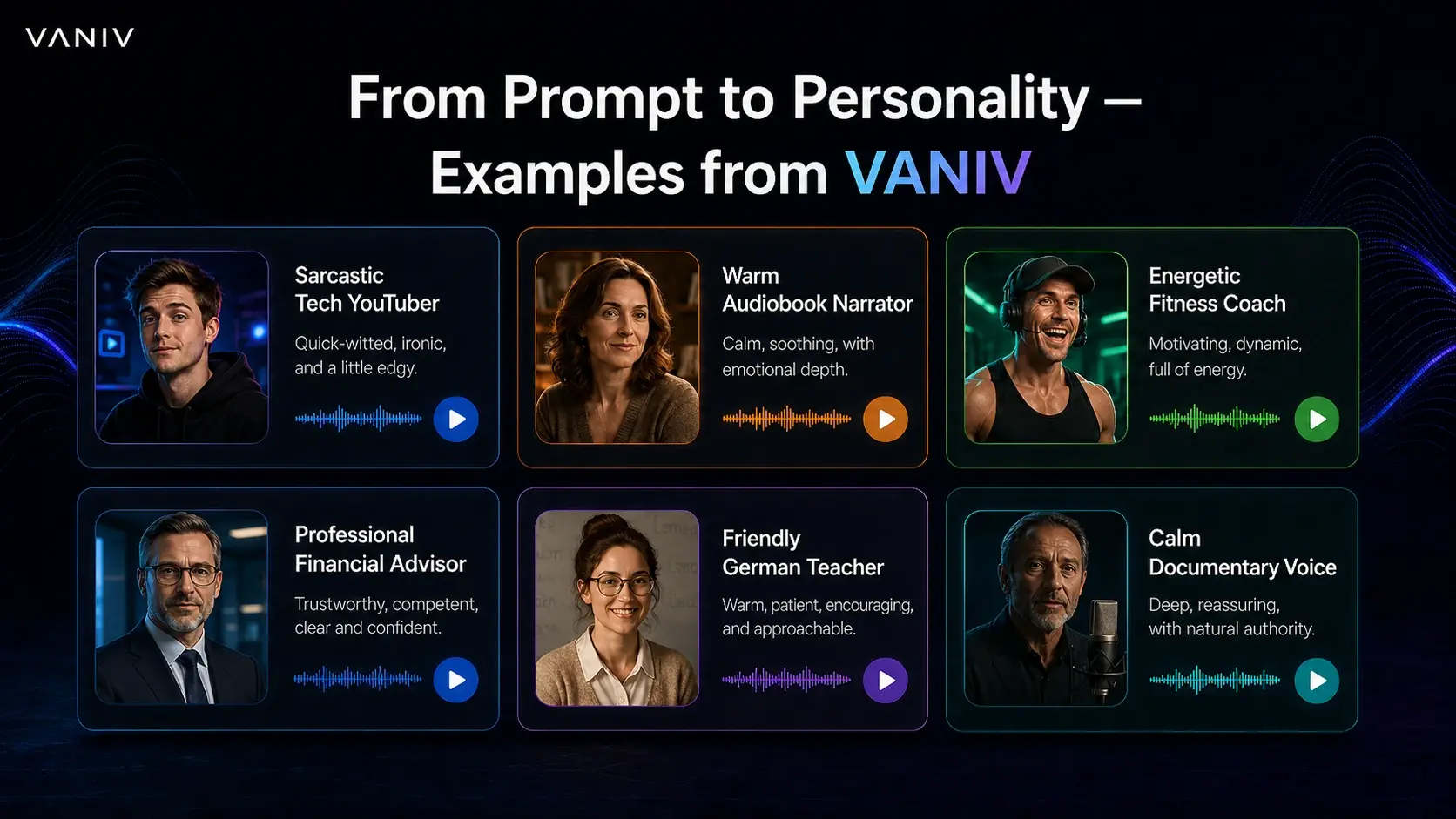
From prompt to personality: how flexible voice design can be.
A good AI voice is not just “male” or “female”. It has a job. It explains, sells, calms, guides, motivates or tells a story.
YouTube channel without your own narrator voice
For faceless YouTube channels, voice design can speed up production. You do not have to record every video yourself, but you can still build a consistent channel voice. The content still matters most: hook, script, editing, thumbnail and retention remain more important than any voice.
Online course with a calm teaching voice
For courses, clarity beats showmanship. A calm, clear voice helps viewers stay with the material longer. For software tutorials, AI workflows and technical explanations, a patient voice is often stronger than a dramatic advertising voice.
Agency with reusable brand voices
Agencies can create different voice profiles for different clients: serious for B2B, warm for education, dynamic for social media and calm for documentation. This turns voice design into a reusable production element.
Dubbing project with several roles
Multilingual videos often need several roles: narrator, interview voice, comment voice, intro voice and supporting explanation. Voice design is useful because you can build speaker roles without recording every role first.
If you later translate full videos, this speaker strategy becomes even more important. A random voice per language quickly feels unprofessional. A better system uses one main narrator, optional secondary voices and a consistent tone across language versions. For the full process, read the guide to local AI video translation.
VANIV Workflow
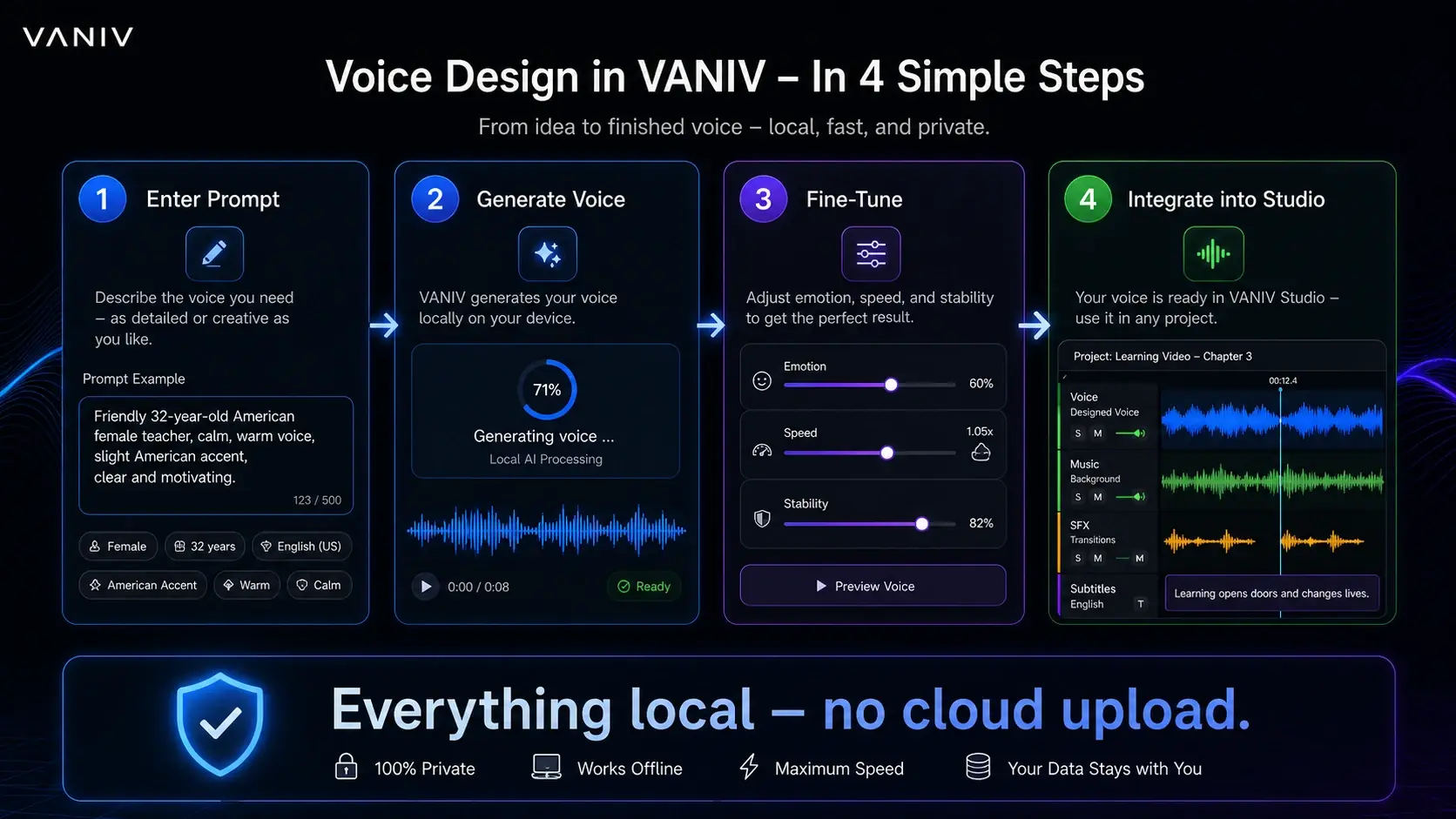
From prompt to finished voice: the local voice design flow.
The real value is not one impressive demo sentence. The value appears when a good voice becomes reusable in your workflow.
Step
What you do
Why it matters
1. Define format
YouTube, course, product video, dubbing or Shorts.
The format defines pace, energy and tone.
2. Clarify audience
Beginners, experts, customers or community.
A beginner voice needs to guide differently than an expert voice.
3. Write prompt
Describe role, tone, pace, character and use case.
Clear direction makes variants easier to compare.
4. Generate short test
Do not render the whole script first. Test 20–40 seconds.
You catch tone, pace and pronunciation issues early.
5. Compare variants
Change one trait at a time: warmer, calmer, faster, more serious.
You find a voice intentionally instead of relying on luck.
6. Save voice profile
Document prompt, notes and use case.
Reuse matters more than one good take.
7. Test in video
Check voice with music, subtitles, pauses and edit.
A voice must work inside the final content, not only solo.
Why this matters for VANIV
VANIV Studio should not treat voice design as an isolated toy generator. Voice design, local text-to-speech, multi-voice dubbing, subtitles, SFX and export belong together in a real creator workflow.
Safety & trust
Important: voice design is not meant for recreating real people.
Voice design is the cleaner path when you want to create a new speaker voice. It should not be used to indirectly imitate celebrities, clients, colleagues or creators. Even a designed voice can become problematic if it is intentionally made to sound like a real person.
- Create new role or brand voices instead of celebrity imitations.
- Use clear disclosure when AI voices matter in sensitive contexts.
- Avoid deception, fake quotes and voices that abuse trust.
- For real persons, consent remains the safe path.
Author & context
Why this guide is trustworthy
This article is part of the VANIV Studio project and comes from building a local AI audio workflow in practice: voice design, voice cloning, text-to-speech, dubbing, subtitles, SFX and export. The goal is not to sell a magic button. The goal is to show where voice design is useful, where it has limits and how creators can use it responsibly.
Compare local AI voice generation with cloud tools
Voice design from text becomes more useful when you understand where local generation gives you more control than a cloud-only workflow.
FAQ
Frequently asked questions about voice design and AI voices from text descriptions
Yes. Voice design starts from a written description instead of an existing recording. You describe role, tone, pace, language and use case, then test and refine the result.
No. Voice cloning tries to recreate an existing authorized voice from audio. Voice design creates a new speaker voice from a prompt. For many creator workflows, voice design is the cleaner starting point.
Usually yes, because you are not trying to imitate a real person. Still, you should avoid misleading use, fake endorsements or anything that suggests a real person said something they did not say.
A good prompt defines role, audience, tone, pace, pronunciation and use case. “Professional voice” is too vague. “Calm tutorial voice for beginner software videos” is much more useful.
Yes. It is especially useful for faceless YouTube channels, tutorials, online courses, product videos and multilingual content. Always test the voice inside the final video context.
For short tests, the requirements depend on the setup. For regular local AI audio production, a modern NVIDIA RTX GPU makes voice, TTS, dubbing and export workflows much more comfortable.
Because creators usually need more than one generated audio file. VANIV is designed around a local workflow where voice design, TTS, voice cloning, dubbing, subtitles, SFX and export belong together.

Further reading
The next useful guides
Voice design is the entry point. After that, explore cloning, dubbing, cloud alternatives and hardware for a stronger local production workflow.
Voice cloning
Clone your own voice
Use your own voice digitally when a newly designed voice is not personal enough.
Text-to-speechLocal text-to-speech
Create scripts, voiceovers and longer spoken content in a controlled local workflow.
Video workflowTranslate videos locally
See how voice design fits into multilingual video, dubbing, subtitles and export.
ComparisonLocal ElevenLabs alternative
Compare cloud voice tools with a local VANIV workflow for creators.
DubbingLocal multi-voice dubbing
Use several speaker roles and voice cues inside a local video workflow.
HardwareGPU for local AI
Understand which GPU makes sense for local voice, TTS and dubbing workflows.
Want to design AI voices locally?
VANIV Studio is in Early Access. Request a non-binding Early Access and test whether voice design, TTS and dubbing fit your creator workflow.
Join Early Access & save 15%