
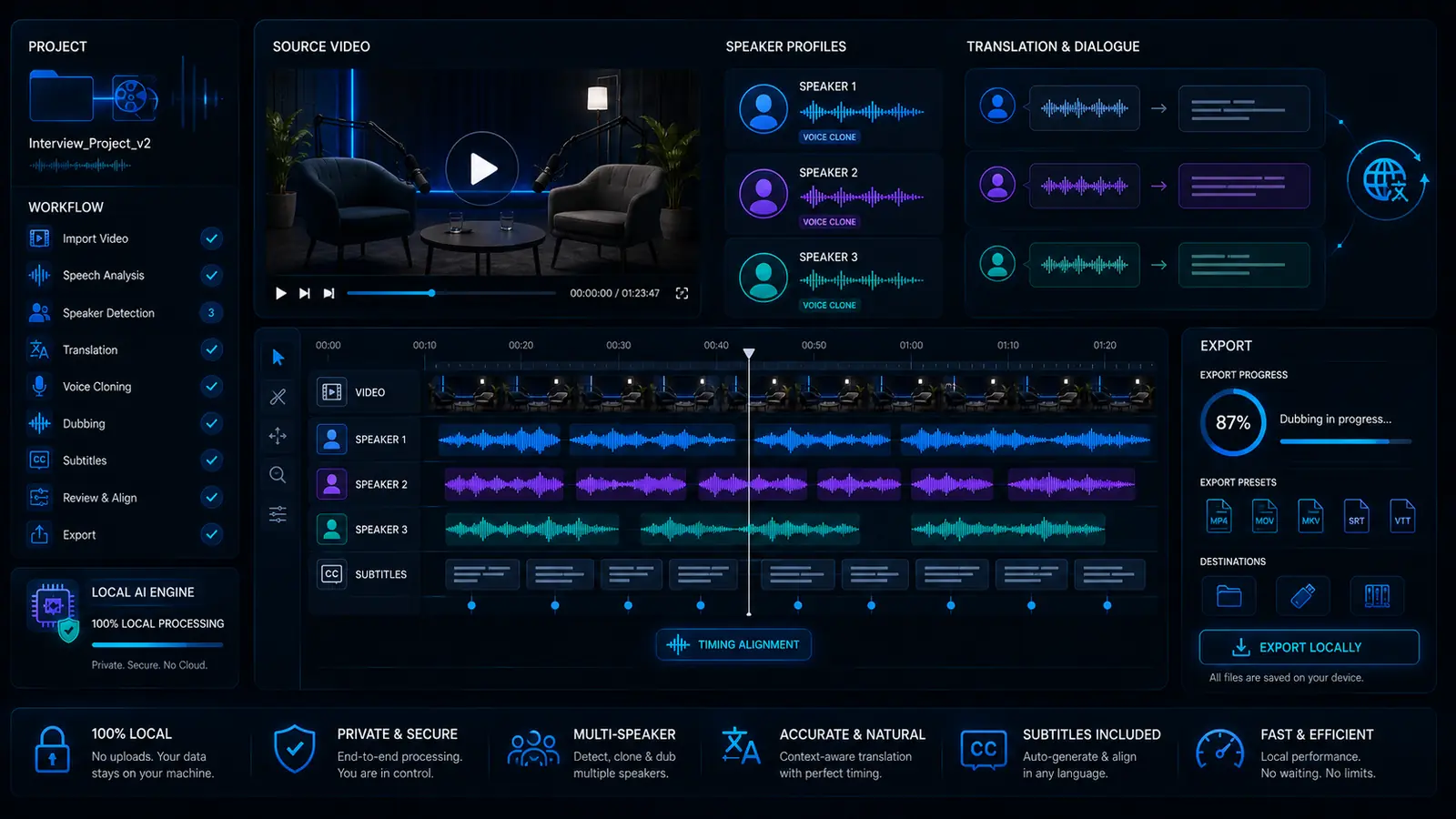
AI multi-speaker dubbing for interviews, podcasts and dialogue videos
Multi-speaker dubbing is much more demanding than a normal voiceover. As soon as several people speak, speaker roles, timing, dialogue structure, voices, subtitles and export have to work together. VANIV treats this as a local AI dubbing workflow for interviews, podcasts, dialogue videos, courses and creator projects.
What is multi-speaker dubbing?
Multi-speaker dubbing means dubbing workflows where more than one voice appears in the video.
Keep several speakers understandable
A normal voiceover often has one main voice. Interviews, podcasts, dialogue videos, courses or scenes with several people are different. The workflow has to understand who speaks, when they speak and which target voice should represent which role.
Dubbing as a structured dialogue workflow
VANIV should not present multi-speaker dubbing as a small extra. It is its own workflow inside video dubbing, video translation and voice cloning. The goal is to keep dialogue understandable and speaker roles clear.
If speaker roles become confusing, even a good translation feels weak. Multi-speaker dubbing therefore needs more control than a simple “text in, voice out” tool.
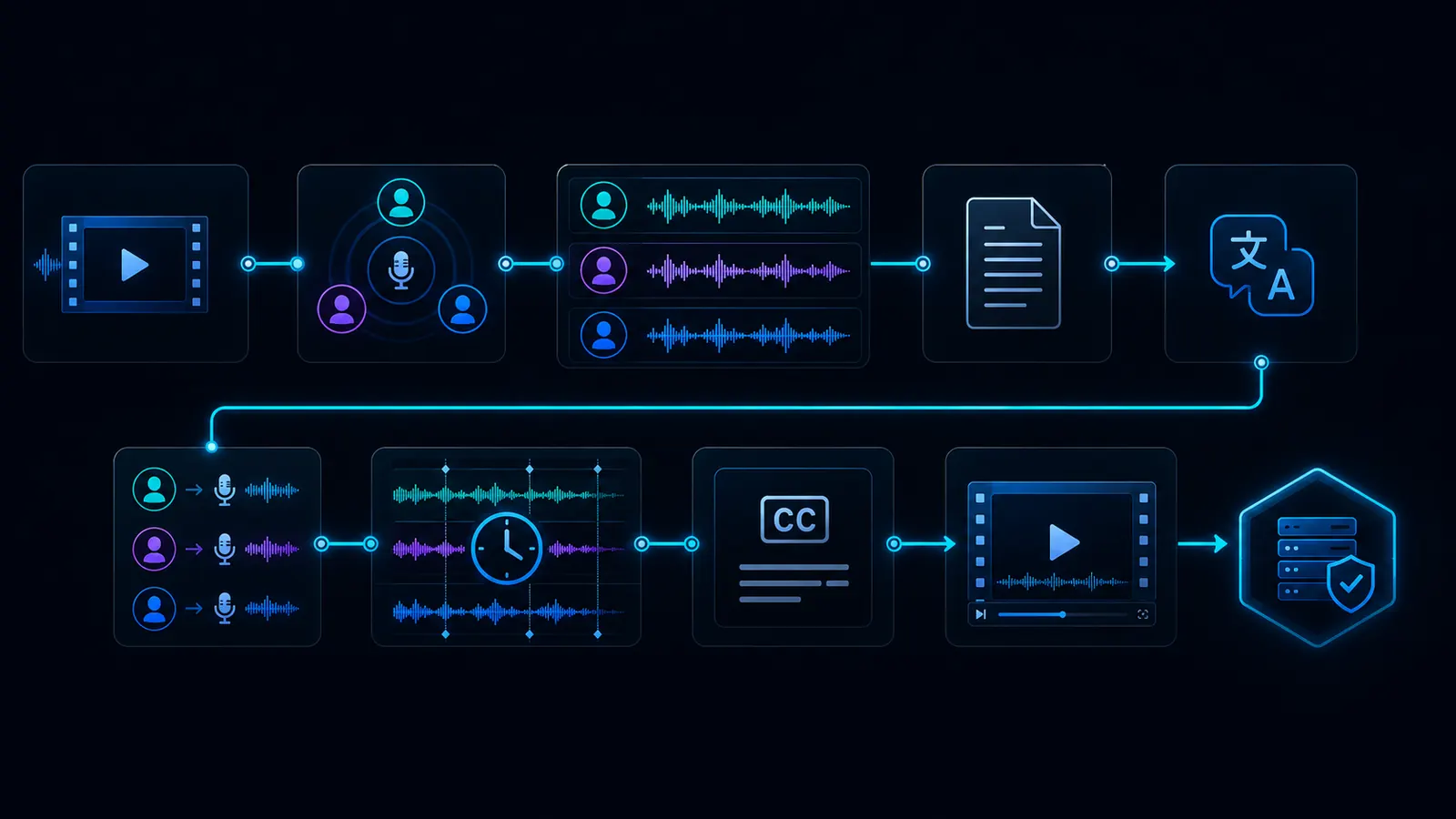
What a local multi-speaker dubbing workflow can look like
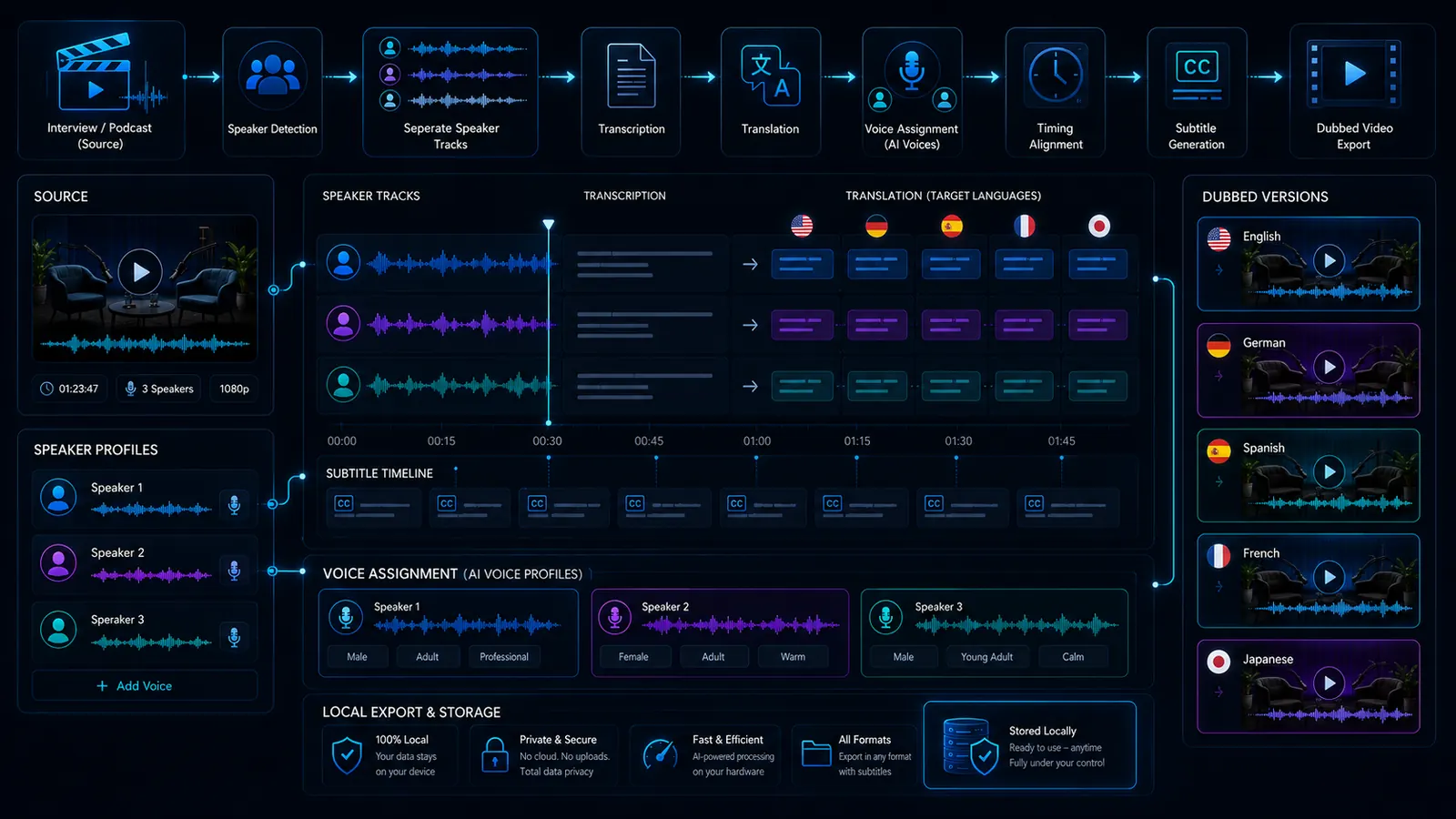
The exact process depends on the material. The basic logic stays the same: detect speakers, understand text, translate, assign voices, check timing and export.
Import
The original video or audio file is loaded into the workflow.
Speaker detection
The workflow tries to separate different speaker roles or segments.
Transcript
The spoken content becomes text and is assigned to sections.
Translation
The dialogue is transferred into the target language without losing meaning or roles.
Voices
The right target voice is selected or prepared for each speaker role.
Timing
Sentences, pauses, switches and interruptions have to fit the video.
Review
Names, terms, roles, sequence and tone are checked.
Export
The new language version is exported with audio, subtitles and project structure.
Why several speakers make AI dubbing harder
One speaker is relatively easy to control. Several speakers immediately introduce new failure points.
The viewer must know who is speaking
When an interview is transferred into another language, speaker roles have to remain clear. As soon as voices are assigned incorrectly, the viewer loses orientation. This is especially critical for interviews, podcasts, panel videos and dialogue scenes.
People do not speak in perfect turns
Real conversations contain interruptions, laughter, short reactions and overlap. These small moments make multi-speaker dubbing difficult. A good workflow has to handle them better than a simple single-speaker voiceover.
Every role needs a suitable voice
With several people, one AI voice is not enough. Depending on the project, each role needs its own voice, tone or clear distinction. Otherwise the result sounds flat or confusing.
Dialogue depends on rhythm
Dialogue is not just text. Pauses, speed and speaker changes create clarity. If the target language is too long, too short or badly placed, the dialogue feels artificial.
Which content benefits most from multi-speaker dubbing?
Make conversations usable internationally
Interviews often contain valuable statements, expert knowledge or personal stories. Multi-speaker dubbing can help make those assets accessible to new audiences without recording the format again.
Translate audio and video podcasts
Podcasts with two or more voices are typical candidates. Evergreen episodes, expert interviews and business podcasts can become more useful in several languages.
Keep training roles understandable
Training videos and courses sometimes contain trainers, guests, moderators and participants. If these roles remain clear, the language version feels much more natural.
Localize client content professionally
Agencies can use multi-speaker dubbing for client interviews, product videos, testimonials or webinar clips. In this context, speed matters, but rights, voices and project structure matter too.
What makes multi-speaker dubbing good?
Quality depends on much more than translation. Speaker separation, voice logic, timing and review are decisive.
Good source quality avoids many problems
The clearer the individual voices are in the original, the better the workflow can process speaker changes, transcript and timing. Strong echo, loud music and overlapping voices make the result harder.
Every voice needs a clear function
In dialogue, voices need to remain distinguishable. Not every role needs a spectacular voice, but every role needs a clear assignment.
Dialogue language has to stay natural
Spoken dialogue works differently from written text. A good translation has to be short enough, clear and natural. Otherwise the dubbed version sounds like subtitles being read aloud.
Speaker mistakes stand out immediately
If roles are swapped or a sentence belongs to the wrong voice, viewers notice quickly. That is why review is even more important for multi-speaker dubbing than for single-speaker voiceover.
Voices, permission and responsibility with several speakers
Several speakers also mean several rights questions. This has to be handled cleanly.
Every voice belongs to a person
If real voices are cloned or imitated, clear permission is required. For interviews, podcasts and client videos, this is especially important because several people may be affected.
Communicate clearly in client projects
For agencies and professional creators, trust matters more than a quick trick. Depending on context, it should be clear that AI dubbing or synthetic voices are being used.
Local-first helps with sensitive projects
Local workflows can help manage raw material, voices and project files with more control. This does not replace rights review, but it reduces unnecessary platform switching.
Professional, not creepy
VANIV should position multi-speaker dubbing as a serious production workflow: own or authorized voices, clear project structure, review and export. Not as a toy for deception.
Which multi-speaker videos should you dub first?
Not every conversation needs several languages immediately. Start with content that has long-term value.
Start with interviews that stay relevant
A news discussion may age quickly. A strong expert interview, tutorial conversation or product webinar can stay useful for a long time. That kind of content is better suited for dubbing.
Choose content with existing demand
If a video already shows watch time, comments, leads or search interest, it is a better candidate than a random clip. Dubbing should start where demand is visible.
Start with manageable conversations
An interview with two clearly separated voices is easier than a chaotic group discussion. For the beginning, short and clear projects are better because review and quality control stay manageable.
Prove it first, then scale
The best strategy is sober: choose one strong video, test one language version, observe the response and only then scale the workflow. This turns multi-speaker dubbing into a production lever instead of a technical toy.
Typical mistakes in multi-speaker dubbing
Several speakers make dubbing complex fast. Many results fail not because of translation, but because of structure problems.
When speakers get swapped
The most common mistake is incorrect speaker assignment. If person A suddenly speaks with person B’s voice, the viewer loses orientation immediately. In interviews, podcasts and dialogue videos, this is especially distracting because the relationship between people is part of the content.
When nobody is distinguishable
Even if assignment is technically correct, voices that sound too similar can cause problems. With several speaker roles, viewers should hear who is speaking. Not every voice has to be extreme, but each voice needs a clear function in the conversation.
When dialogue loses rhythm
Dialogue depends on pauses, reactions and switches. If a translated voice becomes too long, starts too early or swallows interruptions, the conversation feels artificial. That is why timing matters even more in multi-speaker dubbing than in simple voiceover.
Blind export is risky
With several speakers, you almost always need to check: who is speaking, does the voice fit, are names and terms correct, and is the dialogue understandable? A local workflow is valuable, but without review the result can still feel unfinished.
How to assign voices in multi-speaker projects
Not every project needs perfect voice clones. The key is that roles remain clear, legally clean and repeatable.
When real people should remain recognizable
If a creator, host or expert should remain recognizable, voice cloning can make sense. But this requires clear permission and a clean reference recording. Without that foundation, the workflow quickly becomes risky.
When only the speaker role matters
Not every role needs to sound exactly like the original. For courses, explainers or internal training, different synthetic voices may be enough as long as roles stay clear. This can be simpler, faster and legally clearer.
The same role should stay consistent
If you work on several episodes, course modules or interview clips, the same role should not sound different every time. Consistent voices help viewers stay oriented. This is especially important for series formats and recurring speakers.
Voice logic belongs inside the workflow
The advantage of VANIV is not simply generating several audio tracks. The advantage is treating speaker roles, voices, translation, subtitles and export as one connected local workflow. That is what separates a studio from a single generator.
Review checklist before export
Before a multi-speaker dub is published, it should be checked soberly. Otherwise small mistakes can ruin the professional impression.
Are all roles assigned correctly?
Check whether every line belongs to the right person. This sounds basic, but for interviews and podcasts it is the most important quality check. One role mistake can damage the credibility of the whole language version.
Does the dialogue work without the original?
Listen to the new language version as if you did not know the original. Are questions and answers logical? Are interruptions understandable? Does the conversation sound natural or like a broken script?
Do subtitles and voices match?
If subtitles are used, they should match the spoken version. They do not need to repeat every word, but order, meaning and key terms should stay consistent.
Is the file ready for YouTube, clients or website use?
Check volume, format, language, file name, subtitles and target platform. A client webinar clip needs more care than a quick social test. The more professional the use case, the more important the final check becomes.
Example: turning a two-speaker interview into a new language version
A concrete example makes it easier to see why multi-speaker dubbing is more than normal translation.
A host interviews an expert
Imagine a 15-minute interview: a host asks questions, an expert answers, and there are short reactions, pauses and follow-up questions. Viewers immediately understand who has which role. That role logic also has to survive in the dubbed language version.
Questions and answers must not get mixed up
Translation is not only about individual sentences. The flow of the conversation has to remain clear. A question should still sound like a question, an answer has to belong to the right person, and short reactions should not sound like main statements.
Every role needs a suitable sound logic
The host may need a clear and neutral voice, while the expert may sound calmer or more technical. If real voices should remain recognizable, permission is required. If only the roles need to stay understandable, suitable synthetic voices can be enough.
In the end, clarity matters more than a tech demo
Good multi-speaker dubbing works when viewers can follow the conversation without thinking about the technology. Speaker roles, subtitles, timing and export then feel like a clean production workflow. That is exactly where VANIV should be positioned.
Which VANIV page should you read next?
Multi-speaker dubbing connects several core areas. These pages explain the most important building blocks in more detail.
The main workflow for language versions, voice, timing, subtitles and export.
TranslateVideo translationThe foundation for transcript, translation and multilingual video versions.
GuideLocal video translation workflowA step-by-step guide to transcription, speaker roles, timing, subtitles and export.
VoiceLocal voice cloningFor your own or authorized voices in creator and dubbing workflows.
RightsVoice cloning law and ethicsConsent, disclosure and responsible use when several voices are involved.
OfflineOffline AI voice generatorFor local voice generation without pure cloud dependency.
StudioLocal AI studioThe central page for VANIV product logic and local workflows.
HubAll solutionsThe overview for voice, dubbing, translation, hardware and local AI.
Frequently asked questions about multi-speaker dubbing
What is multi-speaker dubbing?
Multi-speaker dubbing means translating and dubbing videos with several speaker roles while keeping voices, timing and dialogue structure understandable.
Is it harder than normal dubbing?
Yes. Several speakers create more assignment, timing and review problems.
Is it useful for interviews?
Yes, especially for expert interviews, podcasts, webinars, panel videos and client conversations with long-term value.
Do I need several cloned voices?
Not always. Sometimes different synthetic voices are enough. If real people should remain recognizable, clear permission is required.
Can I translate podcasts with it?
Yes, especially structured audio or video podcasts with clearly separated speakers.
Why is local multi-speaker dubbing interesting?
Because interviews, voices and client videos can be sensitive. A local workflow gives more control over material, voices and export.
What hardware helps?
For longer videos and several voices, a modern GPU, enough VRAM, RAM and a fast SSD are useful.
Which page should I read next?
Read Video Dubbing, Video Translation or Local Voice Cloning next.
Several speakers need more than a new audio track.
VANIV Studio connects speaker roles, voice cloning, translation, timing, subtitles and export into a local workflow for interviews, podcasts, dialogue videos and creator projects.
Join Early Access & save 15%