
Translate video with AI: from original content to a new language version
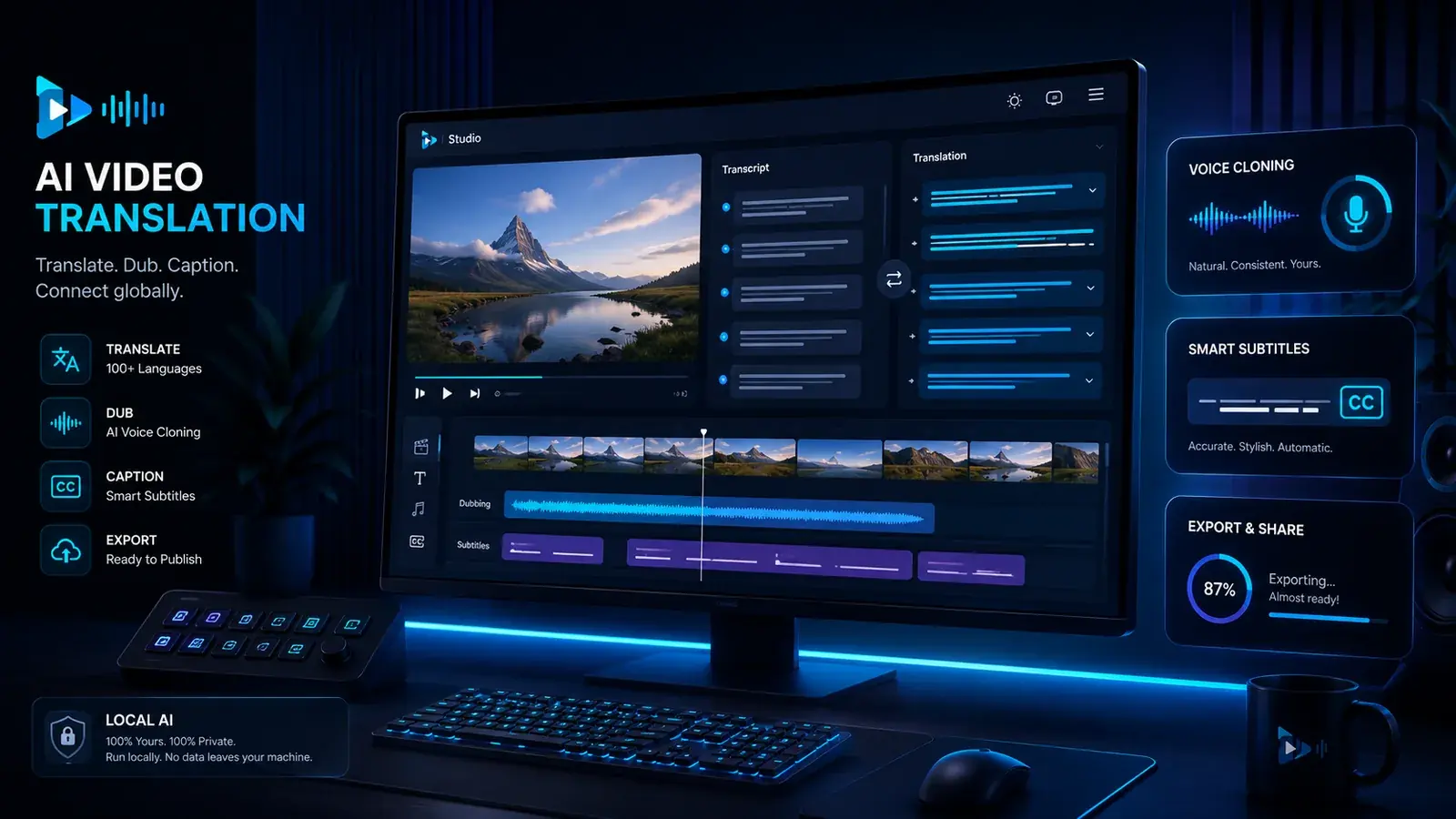
Translating a video means more than generating subtitles. For creators, YouTubers, agencies and product teams, transcript, translation, voice, timing, subtitles, dubbing and export have to work together. VANIV treats video translation as a local creator workflow, not as an isolated cloud click.
What does video translation actually mean?
Many people think of automatically translated subtitles first. That is only one part of the workflow.
The simplest form of video translation
Subtitles are often the first step. A video is transcribed, the text is translated and then displayed as subtitles. This works well for social media, quick tests and international understanding. But it does not replace a real language version when viewers should understand the video without reading.
Translation as a production process
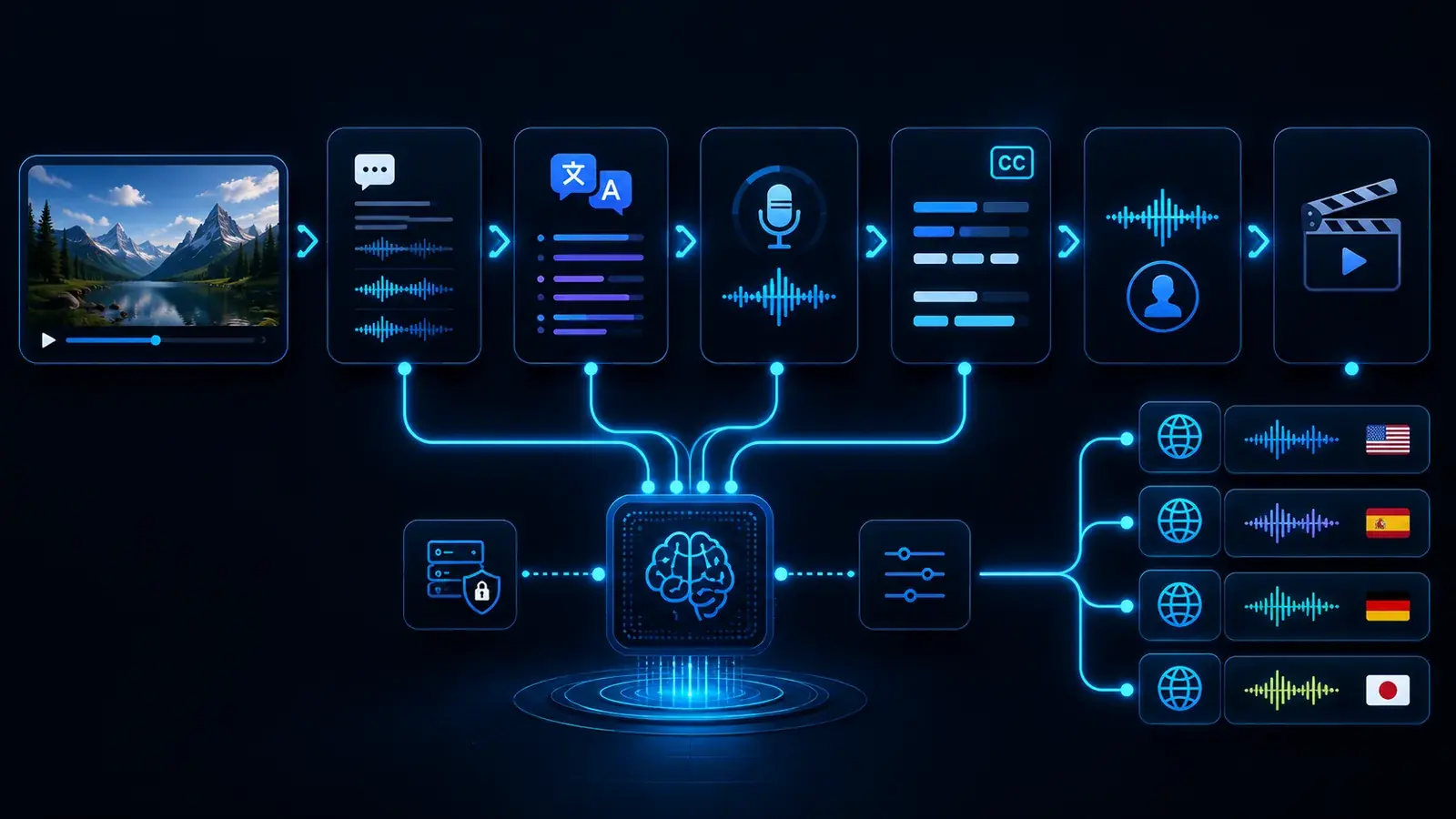
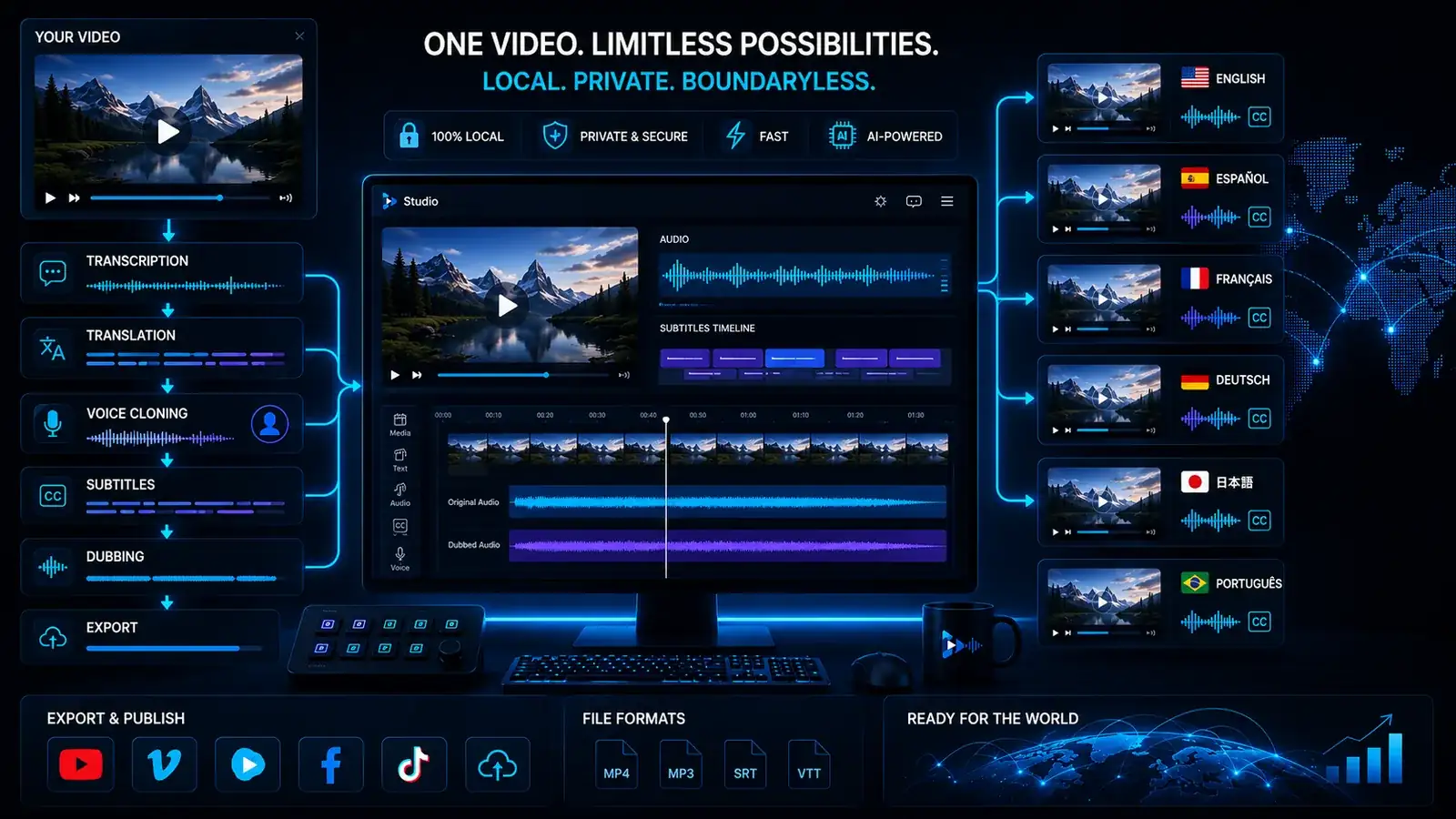
VANIV does not treat video translation as a text-only task. A strong workflow connects transcript, translation, voice cloning, video dubbing, subtitles and export. That is how translated text becomes a real new language version.
Good language versions need meaning, timing, tone, voice, readability and export. That is why a local AI studio like VANIV Studio is especially interesting when you want to publish content regularly in multiple languages.
Why local video translation matters for creators
Cloud tools are convenient. But when voices, videos and repeatable language versions are involved, control becomes much more important.
Project files stay closer to you
Video translation often uses unreleased material: raw videos, client demos, interviews, product clips or course content. A local workflow reduces platform switching and gives you more control over intermediate files, voices, subtitles and exports.
Multiple videos need a process
A single video can be tested with almost any tool. It becomes harder when you want to translate new videos every month. Then you need repeatable steps, clear project structure and reliable exports. That is where local AI compared to cloud tools becomes stronger.
Voice cloning needs responsibility
When translated videos use a cloned or saved voice, the workflow becomes more sensitive. Voices should only be used when they are yours or explicitly authorized. Local workflows fit this controlled and responsible use case better.
Credits and minute limits can slow you down
Many cloud services work with minutes, credits, upload limits or subscription tiers. For tests, that can be fine. For regular video translation, it can become annoying. Local means more hardware responsibility, but also more control over repeat usage.
What a VANIV workflow for video translation can look like
The exact process depends on the project. The basic logic is clear: understand the video, transfer the language, connect voice and subtitles, then export the result.
Import
You start with a video, audio file or existing project material. A clean project start matters more than scattered files.
Transcript
Spoken language becomes text. The transcript is the foundation for translation, subtitles and later editing.
Translation
The content is transferred into the target language. Good translation cares about meaning, tone and context, not only individual words.
Voice
Depending on the workflow, you create a new voiceover track or a dubbed language version with your own or authorized voice.
Timing
The new language has to fit the video. Longer or shorter sentences can affect pacing, pauses and the feeling of synchronization.
Subtitles
Subtitles help with clarity, social media, accessibility and international content use.
Dubbing
When voice and video come together, the result becomes more than translated text: it becomes a new language version.
Export
The final output should be a file you can publish, edit further or deliver to a client.
Which videos benefit most from AI translation?
Use evergreen videos in multiple languages
If a YouTube video keeps getting searched over time, an additional language version can increase reach. Tutorials, reviews, software explainers and how-to videos are especially strong candidates because the content does not expire after a few days.
Make demos and onboarding international
Software demos, product videos and onboarding clips are often too valuable to use in only one language. Local video translation can help prepare existing assets for additional markets.
Reuse learning content
Courses, training videos and internal learning material benefit strongly from translation because they are often structured and reusable. The value increases when videos are not only subtitled but also voiced in a way viewers can follow easily.
Create multilingual variants for clients
Agencies can use video translation to show clients variants faster: another language, different subtitles, adjusted timing or different export versions. A controlled workflow matters a lot in this context.
Video translation, subtitles and dubbing: what is the difference?
These terms are often mixed together. For good content, they should be separated.
Text in another language
Subtitles are the fastest form. Viewers hear the original language and read the translation. This is flexible and useful for social media.
A new voice over the video
A voiceover replaces or overlays the original speech. It can work well for explainers, but it is not always tightly synchronized with the original.
A new language version with timing
Video dubbing tries to bring language, timing, voice and video closer together. For professional language versions, this is often the better direction.
What AI video translation does not solve automatically
AI can accelerate the workflow, but source quality, natural translation, timing and voice rights still need deliberate review.
Bad audio remains difficult
If the source video is noisy, echoey or has music directly under speech, transcript and dubbing become harder. Good results still start with good material.
Not every translation sounds natural automatically
Word-for-word translations can feel unnatural. Good video translation needs to consider meaning and target audience. Marketing, humor and technical language need extra control.
Different languages have different lengths
A sentence in German may be longer or shorter than the same idea in English. This affects pauses, speed and synchronization. Timing is a real workflow step.
Voices need permission
If a voice is cloned or reused, you need clear authorization. VANIV should stand for responsible and permission-based use.
What hardware helps with local video translation?
Local AI needs a solid foundation. Hardware becomes important for longer videos and multiple language versions.
VRAM and RTX performance matter
For local AI, GPU and VRAM are crucial. The longer the videos and the more complex the workflow becomes, the more a suitable graphics card matters. Read more in the GPU guide.
Why video translation is so valuable for YouTube and creators
Many creators already produce strong content, but use it in only one language. That is where a lot of unused potential sits.
One strong video can work in several markets
If a video keeps getting searched, it can be worth more than once. Tutorials, software guides, product comparisons, explainers and how-to content can bring visitors for months or years. An additional language version can turn an existing asset into an international asset. For creators, that is powerful because the whole video does not need to be produced again from scratch.
Many questions exist in several languages
A problem that German viewers search for is often searched in English, Spanish or French too. Publishing in only one language limits reach. Translating YouTube videos can therefore become a strong lever when topic, audience and content quality fit together.
Your own voice can support recognition
Subtitles are useful, but a clear spoken language version often feels more personal. If your own or an authorized voice remains recognizable, the brand can feel more consistent in other languages too. That is why voice cloning often belongs directly next to video translation.
Scaling needs structure
Translating one video is an experiment. Bringing a channel into several languages is a workflow. You need a clear path for transcript, translation, voice, subtitles, dubbing, quality review and export. VANIV is positioned exactly in that direction: as a local studio for repeatable creator production.
What makes AI video translation actually good?
Good results do not come from the AI model alone. They come from clean source material, suitable language, a fitting voice and controlled export.
Clean source material is the biggest lever
When speech is recorded clearly, transcription can work much more reliably. Heavy noise, echo, loud music or several people speaking at once make every later step harder. Creators who want to translate videos regularly should care about good audio quality in the original video.
Meaning beats word-for-word translation
A good video translation transfers meaning, not only words. Tutorials, marketing, humor, technical language and product demos need to sound natural in the target language. A local workflow helps because translation, voice and timing can be reviewed together.
The voice has to fit the content
A language version only feels convincing when voice, pacing and tone match the video. Tutorials benefit from a calm and clear voice. Short creator clips may need more energy. Brand and product videos need consistency. That is why translation and voice should not be treated as separate islands.
AI needs control, not blind trust
Automation saves time, but it does not remove quality review. Names, technical terms, numbers, product names and calls to action should be checked. Good AI video translation is an assisted workflow, not a blind export button.
Subtitles, voiceover or dubbing: what fits your video?
Not every video needs the same solution. The right choice depends on goal, budget, quality level and audience.
Good for fast reach
Subtitles are the fastest and simplest option. They work well for social media, first tests, short videos and content where the original audio should remain. The downside: viewers have to read and the video can feel less direct.
Good for explainers and tutorials
A voiceover makes sense when the new language should be heard, but perfect synchronization is not required. This works well for screen recordings, software demos, courses and explainers. The voice and timing still need to remain understandable.
Good for higher-quality language versions
Dubbing is the most involved option, but often the strongest one. Voice, timing, subtitles and video should work together. For professional YouTube versions, product videos, agency projects and multilingual brand content, video dubbing is often the best direction.
Start new workflows with subtitles or a simple voiceover when you want to test quickly. If a video proves reach or matters commercially, moving toward dubbing makes much more sense. That way you do not waste time on videos nobody watches.
Which videos should you translate first?
Not every video deserves a new language version immediately. The fastest progress comes from starting with the right content.
Start with videos that already work
The best candidates are videos that already receive clicks, watch time, comments or search impressions. If a video works in one language, the chance is higher that it can also create interest in another language. For creators, this is much smarter than translating every new video randomly.
Translate long-lasting content first
Tutorials, software guides, product demos, comparisons, explainers and problem-solving videos are especially strong candidates. These videos are often searched for over a long period of time. A new language version can therefore create value for months or even years.
Prioritize videos with a clear purpose
If a video explains a product, supports customers, creates leads or makes an offer easier to understand, translation is usually more valuable than for random short clips. For software, courses, agencies and creator businesses, the right language version can have direct business value.
Test first, then scale
A strong strategy is simple: translate a few proven videos first, watch reach and response, then build a repeatable workflow. That is where VANIV fits: do not process every video blindly, but connect transcript, translation, voice, subtitles, dubbing and export into a local production process.
Which VANIV page should you read next?
Video translation sits in the middle of the VANIV workflow. These pages help you understand the next building blocks.
If you want to turn translation into a real new language version.
GuideComplete local workflowFollow transcription, translation, speaker assignment, timing, subtitles and export step by step.
VoiceLocal voice cloningFor your own or authorized voices in repeatable creator workflows.
YouTubeYouTube video translatorFor creators who want to make existing videos more useful internationally.
DialogueMulti-speaker dubbingFor interviews, podcasts and videos with several speakers.
StudioLocal AI studioThe central page for VANIV product logic and local workflows.
HubAll solutionsThe overview for voice, dubbing, translation, hardware and local AI.
Frequently asked questions about AI video translation
Can I automatically translate a video with AI?
Yes, but quality depends on the source material, language, translation and desired output. Professional language versions need more than automatic text.
What is the difference between subtitles and dubbing?
Subtitles display translated text. Dubbing creates a new language version with voice and timing. Both can work together very well.
Is local video translation better than cloud?
Not always. Cloud is convenient for quick tests. Local becomes stronger when control, privacy, repeatability and project structure matter.
Do I need voice cloning for this?
Not necessarily. You can work with subtitles or voiceover. Voice cloning becomes interesting when a recognizable own or authorized voice should remain part of the content.
Is this useful for YouTube?
Yes, especially for evergreen videos, tutorials, product videos and content that people search for in other languages.
Can I translate client videos?
Yes, but only with the right rights and permissions. Client material is exactly where a controlled local workflow becomes interesting.
What hardware do I need?
For serious local workflows, a modern GPU, enough VRAM, sufficient RAM and a fast SSD are useful.
Which page should I read next?
Read Video Dubbing, Local Voice Cloning or Local AI Studio next.
Do not translate videos as text only. Build a real language workflow.
VANIV Studio connects video translation, voice, subtitles, dubbing and export into one local creator workflow. If you want to use content regularly in multiple languages, that connection is the advantage.
Join Early Access & save 15%