
AI video dubbing: turn videos into new language versions
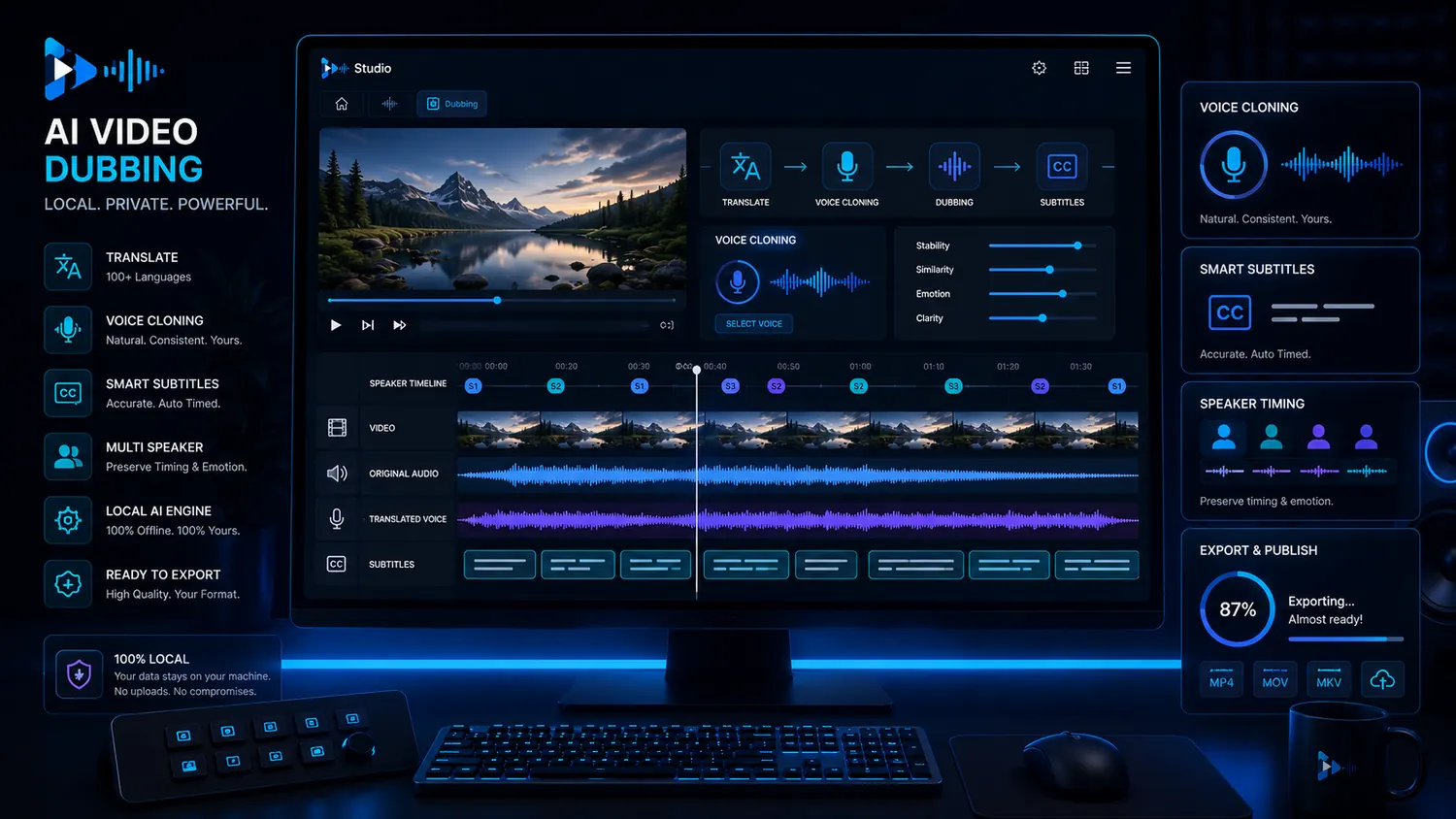
Video dubbing is more than a new audio track. Strong language versions need transcript, translation, voice, timing, subtitles, speaker roles and export. VANIV treats AI video dubbing as a local creator workflow instead of a loose cloud generator.
What is video dubbing?
Video dubbing is the step from translated text to an audible new language version.
Make a new language audible
Video dubbing means creating a new spoken language version for a video. It can be a simple voiceover or a more carefully aligned version with timing, subtitles and export. For creators, YouTubers, agencies and product teams, dubbing becomes interesting when one video should work in several markets.
Dubbing as a workflow, not a single tool
VANIV does not treat video dubbing as an isolated button. A good process connects video translation, transcript, voice cloning, subtitles, timing and export. That is how a translation becomes a usable new language version.
Subtitles help, but many viewers want to hear videos, not read them. If you want to use explainers, YouTube videos, product demos or courses internationally, a dubbed language version can feel much stronger.
What a local video dubbing workflow with VANIV can look like
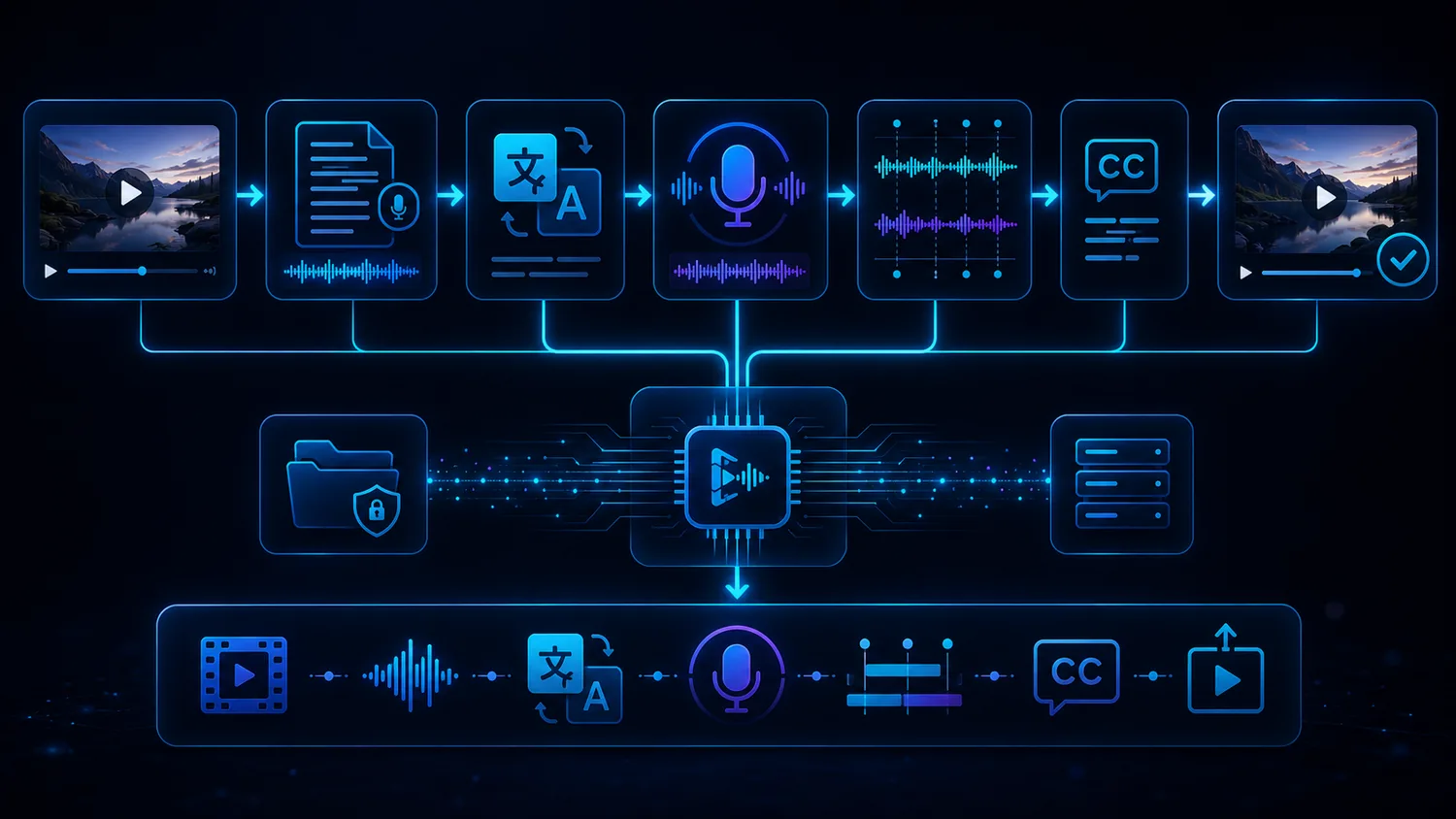
The exact process depends on the material. The basic logic stays the same: understand the video, transfer the language, create voice, check timing and export cleanly.
Import
You start with the original video or audio file. A clean project start matters.
Transcript
The original speech becomes text. This is the foundation for translation and subtitles.
Translation
The content is transferred into the target language. Meaning and tone matter more than word-for-word translation.
Voice
A suitable voice is used or generated. Voice cloning requires clear permission.
Timing
The new language has to fit the video. Sentence length, pauses and speed matter a lot.
Subtitles
Subtitles help with control, clarity, social media and international use.
Review
Names, terms, numbers and important claims should be checked. AI needs control.
Export
The final output should be a file you can publish, edit further or deliver to a client.
Why local AI video dubbing makes sense for creators
Cloud services are convenient. But when voices, client videos and repeatable language versions are involved, control matters more.
Videos and voices are sensitive assets
Dubbing often uses raw videos, voices, client demos or unreleased material. A local workflow reduces the number of external platforms and gives you more control over files, voices, intermediate steps and exports.
A channel needs processes, not one-off tests
Testing one video is easy. Publishing videos in several languages regularly is a process. You need clean structure, saved workflows and reliable results. That is where VANIV as a local AI studio becomes interesting.
Credits and minute limits can slow you down
Many cloud solutions work with minutes, credits or upload limits. For tests, that is fine. For long-term production, it can become annoying. Local means more hardware responsibility, but also more control over repeat usage.
Local-first is not dogma
VANIV does not need to claim cloud is always bad. The better point is this: when you need control, repeatability and project structure, local AI is often the stronger foundation. That is also explained on Cloud vs local AI.
Which videos benefit most from AI dubbing?
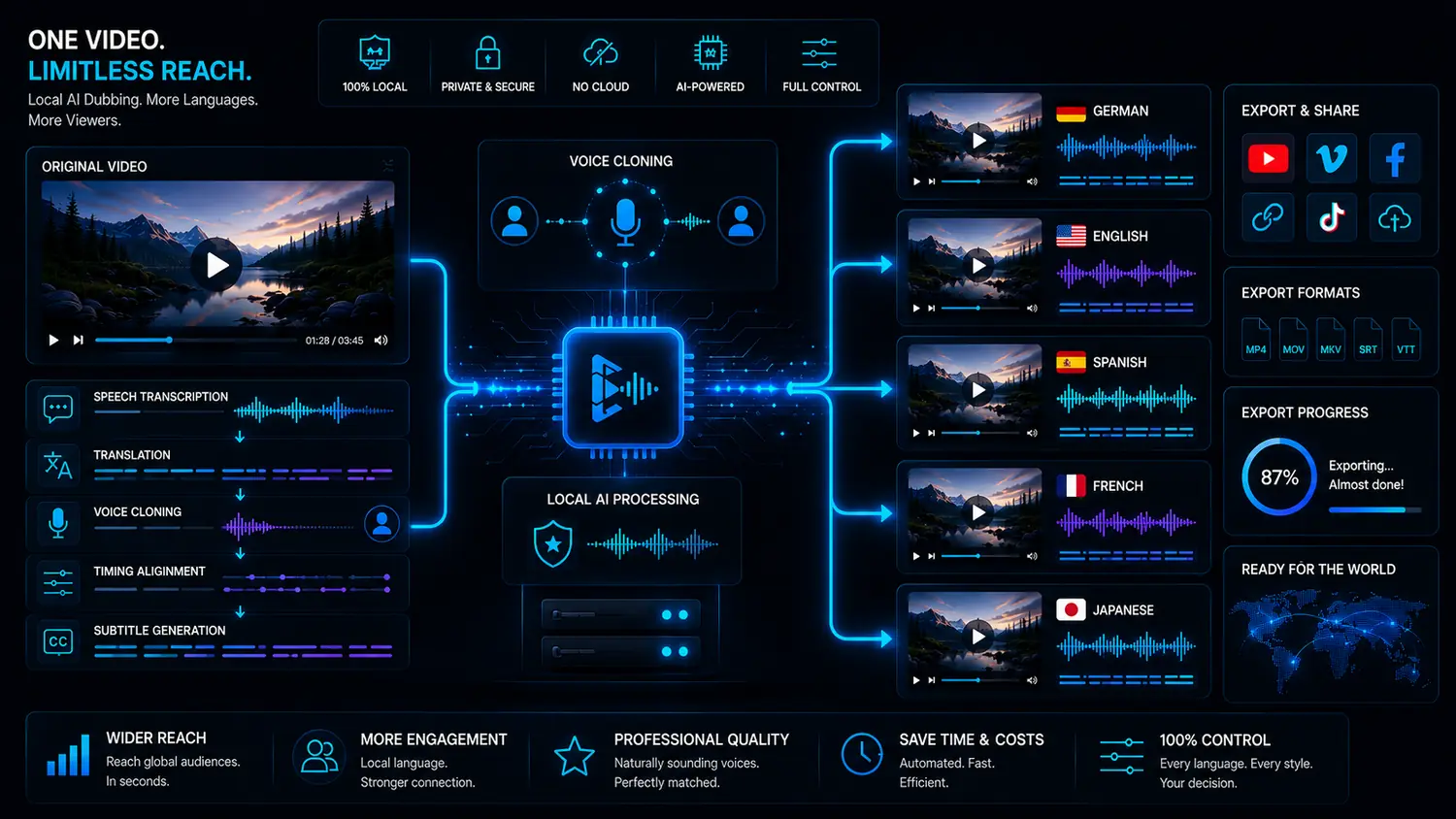
Use evergreen videos internationally
A strong tutorial, review or how-to video can work in several languages. Search-driven content is especially interesting because it does not disappear after a few days. For creators, dubbing can make existing videos more useful for a wider audience.
Translate demos and onboarding
Software demos, product clips and onboarding videos often take effort to produce. A new language version can help use existing content in other markets without recording everything again.
Make learning content easier to follow
For courses, training and internal learning, text alone is often not enough. A spoken language version is more comfortable and can make learning content more useful internationally.
Prepare language versions for clients
Agencies can use dubbing to offer ad clips, explainers and product demos in several variants. In this context, speed matters, but control over client data and export quality matters too.
Video dubbing, voiceover and subtitles: what is the difference?
These terms are often mixed together. For good workflows, they should be separated.
Fast and flexible
Subtitles are the simplest option. Viewers hear the original language and read the translation. This works well for social media, but it is less direct than a spoken language version.
A new voice over the video
Voiceover makes sense when perfect synchronization is not required. It can work very well for tutorials, product demos and screen recordings.
A new language version with timing
Dubbing goes further: voice, timing, subtitles and export should work together. For high-quality language versions, this is often the stronger approach.
What makes AI video dubbing actually good?
Good dubbing does not happen automatically. The main factors are source material, translation, voice, timing and review.
Clean source material helps enormously
When original speech is clear, the entire workflow works better. Strong echo, noise, loud music or several people speaking at once make transcript and dubbing harder.
Meaning instead of word-for-word
A good language version transfers meaning, not just words. Technical language, humor, marketing and product demos need to sound natural in the target language.
The voice has to fit the video
A voice should support the content, audience and brand. Tutorials need clarity. Creator clips can use more energy. Product videos need consistency.
Different languages have different lengths
A target language is often longer or shorter than the original. This affects pauses, speed and synchronization. Timing is not a side topic; it is central to dubbing.
Which videos should you dub first?
Not every video deserves a new language version immediately. Start with content that already shows signals.
Start with videos that get clicks and search interest
If a video already gets impressions, clicks, watch time or comments, it is a better candidate than a random clip. Dubbing is most useful where demand already exists.
Prioritize long-lasting content
How-to videos, software tutorials, comparisons, product demos and learning content are especially strong. A new language version can create value for months or years.
Prefer videos with a clear goal
If a video helps customers, explains a product, creates leads or makes an offer easier to understand, dubbing is more valuable than for spontaneous clips without a clear purpose.
Test first, then scale
The most useful strategy is simple: select a few strong videos, test language versions, observe the response and then scale the workflow. This turns AI dubbing into a production lever, not a toy.
What hardware helps with local AI video dubbing?
Local AI needs a solid foundation. Longer videos and several languages benefit from good hardware.
VRAM and compatible GPU acceleration matter
For local AI, compatible GPU acceleration plays a central role. More VRAM can help with larger models and more complex workflows. VANIV uses ONNX-based support for suitable NVIDIA, AMD and Intel hardware; our GPU guide explains what to look for.
Why multi-speaker dubbing is its own challenge
One speaker is relatively simple. Interviews, podcasts and dialogue formats need much more structure.
Voiceover and dubbing are easier to control
A tutorial, product demo or classic explainer often has one main voice. That makes translation, timing and voice output much easier to control. Many creators should start here because the workflow stays manageable and review is simpler.
Dialogue needs speaker logic
As soon as several people speak, one voice is not enough. Speaker changes, roles, pauses, interruptions and overlap need to remain understandable. That is why multi-speaker dubbing is its own workflow, not just a longer version of normal dubbing.
Voices must not become confusing
For interviews or podcasts, viewers need to understand who is speaking. If voices sound too similar or speaker changes are wrong, the language version quickly feels artificial. A good dubbing workflow has to preserve structure, not just generate audio.
Stabilize simple workflows before moving to complex ones
For creators, it makes sense to start with simple videos: one clear voice, good audio and manageable length. After that, more complex projects like interviews, dialogue and multilingual versions become easier. This turns dubbing into a real production process instead of chaos.
What makes AI video dubbing feel unprofessional fast?
Many dubbing results fail not because the idea is bad, but because small quality problems add up.
When the voice does not fit the video
A language version can be technically correct and still feel wrong if timing, pauses and speaking speed do not fit. Viewers notice quickly when a voice ends too early, starts too late or sounds unnaturally rushed. That is why timing is central to good video dubbing.
When the voice does not fit the content
The wrong voice can weaken even a good translation. Tutorials need clarity, product videos need trust and creator clips need personality. Dubbing should not only make text audible; it should support the purpose of the video.
When the target language sounds unnatural
Many weak dubs sound like translated text, not spoken language. This happens when the wording stays too close to the original. Strong dubbing language should sound natural, clear and suitable for the target audience.
When everything is exported blindly
AI can save a lot of work, but it does not remove review. Names, numbers, technical terms, product names and important claims should be checked. For business videos, review is not a luxury; it is required.
How to use video dubbing in a content strategy
Dubbing works best when it is connected to clear goals instead of random experiments.
Dub proven winners first
On YouTube, you should not dub every new video immediately. Start with videos that already get search impressions, watch time or comments. If a video works in one language, the chance is higher that a second language has potential too. The YouTube video translator page is a good next step for this use case.
Support sales and onboarding
Product demos, onboarding videos and tutorials can save a lot of work in multiple languages. Instead of explaining the same process again and again, a dubbed language version can support international customers, support requests and landing pages.
Internationalize learning content
Courses and training videos are often ideal for dubbing because they are structured and used for a long time. A good spoken language version can be easier to consume than subtitles alone. Especially with complex topics, listening is often more comfortable than reading.
One workflow for repeatable production
The real advantage does not appear in the first test, but around the tenth video. When transcript, translation, voice, subtitles and export work together clearly, dubbing becomes more predictable. That is what VANIV should stand for: local AI for creators who want to produce regularly.
Which VANIV page should you read next?
Video dubbing is a central workflow. These pages explain the most important building blocks.
The foundation for new language versions with transcript, translation and subtitles.
GuideLocal translation workflowThe complete process from source video and transcript to voice, timing, subtitles and export.
VoiceLocal voice cloningFor your own or authorized voices in repeatable creator workflows.
DialogueMulti-speaker dubbingFor interviews, podcasts and videos with several speaker roles.
YouTubeYouTube video translatorFor creators who want to use existing content internationally.
StudioLocal AI studioThe central page for VANIV product logic and local workflows.
HubAll solutionsThe overview for voice, dubbing, translation, hardware and local AI.
Frequently asked questions about AI video dubbing
What is AI video dubbing?
AI video dubbing uses transcription, translation and synthetic or cloned voices to make a video audible in another language.
What is the difference from subtitles?
Subtitles display text. Dubbing creates a spoken language version. Both can work together very well.
Do I need voice cloning?
Not necessarily. Voice cloning becomes interesting when your own or an authorized voice should remain recognizable.
Is local dubbing better than cloud?
Not always. Cloud is convenient for tests. Local is stronger when control, privacy, repeatable workflows and project structure matter.
Is dubbing useful for YouTube?
Yes, especially for evergreen videos, tutorials, product videos and content with international search potential.
Can I dub client videos?
Yes, but only with the right rights and permissions. Client videos are exactly where a controlled local workflow becomes interesting.
What hardware do I need?
For serious local workflows, a modern GPU, enough VRAM, sufficient RAM and a fast SSD are useful.
Which page should I read next?
Read Video Translation, Local Voice Cloning or Multi-Speaker Dubbing next.
Local dubbing needs realistic hardware expectations
For short tests, 12GB VRAM can be enough. Longer videos, multiple voices and exports benefit from more headroom.
Dubbing is the step from translation to a real language version.
VANIV Studio connects video dubbing, translation, voice, subtitles and export into one local creator workflow. If you want to use videos regularly in several languages, that connection is the advantage.
Join Early Access & save 15%